¶ Roles and Privileges
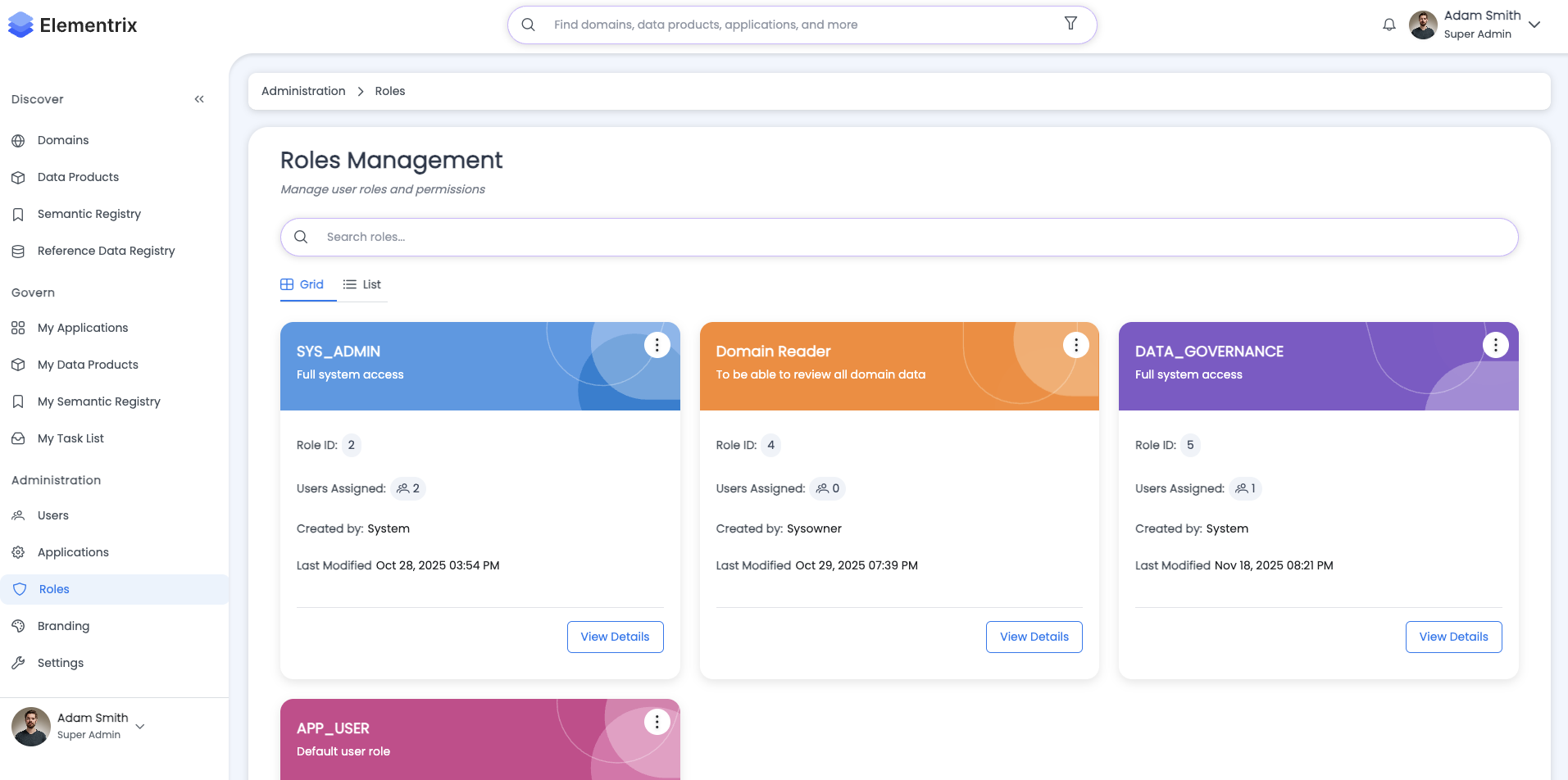
Elementrix uses a comprehensive Role-Based Access Control (RBAC) model to manage permissions across the data product lifecycle and platform administration.
¶ Overview
What is RBAC?
Role-Based Access Control is a security model that assigns permissions to users based on their roles within the organization. In Elementrix:
- Roles define sets of permissions
- Users are assigned one or more roles
- Permissions control what actions users can perform
- Access is controlled at every lifecycle phase
Key Benefits:
- Simplified permission management
- Consistent access control
- Audit trail of role assignments
- Scalable security model
- Domain-specific restrictions
¶ User Roles
¶ End User Default (APP_USER)
Purpose: Standard platform user with basic access
Capabilities:
- Discovers and consumes data products
- Requests access to published products
- Views public information and documentation
- Creates and owns data products
- No modification rights to others' products
Automatically Assigned: Yes (all users)
¶ Data Stewards' Team
Purpose: Collaborative team members who help maintain data products
Capabilities:
- Members of the data steward team assigned to a data product
- Collaborates on product creation and maintenance
- Edits metadata, schema, and documentation
- Cannot publish or delete products (owner only)
- Supports product owners in day-to-day operations
Assignment: Product owner assigns stewards to specific products
¶ Data Owners' Team
Purpose: Product ownership with full lifecycle control
Capabilities:
- Product owner and their team members
- Full control over their products
- Can publish, deprecate, and retire products
- Manages team membership and permissions
- Approves access requests
- Sets product strategy and direction
Assignment: Automatic for product creator, can add team members
¶ Data Governance Team (DATA_GOVERNANCE)
Purpose: Governance and compliance oversight
Capabilities:
- Reviews and approves products for publication
- Ensures compliance with governance policies
- Can request changes or reject submissions
- Monitors product quality across organization
- Enforces data standards
- Cannot create or modify products directly
Assignment: Administrator assigns to governance team members
¶ Elementrix Admin (SUPER_ADMIN)
Purpose: Platform administration and configuration
Capabilities:
- System-level administration
- Manages users, roles, and system configuration
- Full access to all products (read-only by default)
- Cannot modify products unless also assigned as owner/steward
- Platform branding and customization
- Integration configuration (SSO, AD, staging)
Assignment: Administrator assigns to IT/platform team
¶ Root Admin (ROOT_ADMIN)
Purpose: Ultimate system control (emergency only)
Capabilities:
- Unrestricted system access
- Cannot be modified or deleted
- Limited to 1 user for security
- Used for initial setup and emergency access
- Can override any permission
Assignment: System-defined, cannot be assigned to multiple users
¶ System Roles Details
¶ Built-in Roles
ROOT_ADMIN:
Characteristics:
- Unrestricted system access
- Cannot be modified or deleted
- Limited to 1 user for security
- Used for initial setup and emergency access
- Can modify any role except itself
- Highest privilege level

User Count: 1 (system-defined)
Modifiable: No
Deletable: No
SUPER_ADMIN:
Characteristics:
- Broad administrative privileges
- Can manage users, products, and applications
- Cannot modify ROOT_ADMIN
- Recommended for IT administrators
- Platform configuration access
- Full audit log access

User Count: Configurable (typically 5-15)
Modifiable: Permissions can be adjusted
Deletable: No (built-in role)
REGULAR_DEFAULT_USER:
Characteristics:
- Standard user permissions
- Automatically assigned to all users
- Can create and own data products
- Can request access to published products
- Cannot be removed from users
- Base permission set

User Count: All users
Modifiable: No (default permissions)
Deletable: No (required for all users)
DATA_GOVERNANCE:
Characteristics:
- Review and approve data products
- Enforce governance policies
- View all products
- Monitor compliance
- Cannot create or modify products directly
- Focus on quality and standards

User Count: Configurable (typically 3-10)
Modifiable: Permissions can be adjusted
Deletable: No (built-in role)
¶ Custom Roles
Organizations can create custom roles for specific needs:
Examples:
- Finance Data Steward
- Marketing Data Owner
- Analytics Team Member
- External Auditor
- Compliance Officer
- Domain Administrator
Custom Role Features:
- Configurable permission sets
- Domain-specific restrictions
- Temporary or permanent
- Template-based creation
- Bulk user assignment
¶ Permissions by Lifecycle Phase
¶ Draft Phase
End User:
Permissions:
- ✗ Cannot view
- ✗ Cannot discover
- ✗ Cannot access

Rationale: Products in draft are work-in-progress
Data Stewards' Team:
Permissions:
- ✓ View product details
- ✓ Edit metadata
- ✓ Modify schema
- ✓ Update documentation
- ✓ Add semantic mappings
- ✓ Add contributors
- ✓ Add tags
- ✗ Cannot publish (owner only)
- ✗ Cannot delete (owner only)

Rationale: Stewards support owners with product creation
Data Owners' Team:
Permissions:
- ✓ Full edit rights
- ✓ Modify all product details
- ✓ Submit for review
- ✓ Assign stewards
- ✓ Delete product
- ✓ Change ownership (owner only)

Rationale: Owners have complete control over their products
Data Governance Team:
Permissions:
- ✓ View all draft products
- ✓ Provide early feedback (optional)
- ✗ Cannot modify
- ✗ Cannot approve (not yet submitted)

Rationale: Early visibility for governance planning
Elementrix Admin:
Permissions:
- ✓ View all draft products
- ✓ Provide technical support
- ✗ Cannot modify (unless assigned as owner/steward)

Rationale: Support role, not product management
¶ Submitted for Review Phase
End User:
Permissions:
- ✗ Cannot view
- ✗ Cannot discover
- ✗ Cannot access

Rationale: Under governance review
Data Stewards' Team:
Permissions:
- ✓ View product details
- ✓ View governance feedback
- ✓ Make requested changes
- ✗ Cannot submit for review (owner only)
- ✗ Cannot withdraw submission (owner only)

Rationale: Support owner with governance requests
Data Owners' Team:
Permissions:
- ✓ View governance feedback
- ✓ Make requested changes
- ✓ Withdraw submission
- ✓ Re-submit after changes
- ✗ Cannot approve (governance only)

Rationale: Address governance feedback
Data Governance Team:
Permissions:
- ✓ View submitted product
- ✓ Review all details
- ✓ Provide feedback
- ✓ Request changes
- ✓ Approve for publishing
- ✓ Reject submission
- ✗ Cannot modify product directly

Rationale: Governance review and approval authority
Elementrix Admin:
Permissions:
- ✓ View submitted products
- ✓ Monitor review process
- ✗ Cannot approve (governance only)

Rationale: Oversight and support
¶ Approved for Publishing Phase
End User:
Permissions:
- ✗ Cannot view
- ✗ Cannot discover
- ✗ Cannot access

Rationale: Not yet published
Data Stewards' Team:
Permissions:
- ✓ View product details
- ✓ Prepare for publication
- ✓ Update documentation
- ✗ Cannot publish (owner only)
- ✗ Cannot modify schema (frozen after approval)

Rationale: Schema locked, documentation updates only
Data Owners' Team:
Permissions:
- ✓ Publish product
- ✓ Update documentation
- ✓ Set publication date
- ✗ Cannot modify schema (frozen after approval)
- ✗ Must resubmit for schema changes

Rationale: Ready to publish, schema approved
Data Governance Team:
Permissions:
- ✓ View approved products
- ✓ Monitor publication
- ✓ Revoke approval (if issues found)

Rationale: Ensure approved state maintained
Elementrix Admin:
Permissions:
- ✓ View approved products
- ✓ Assist with publication
- ✗ Cannot publish (owner only)

Rationale: Technical support for publication
¶ Published Phase
End User:
Permissions:
- ✓ Discover product in marketplace
- ✓ View public information
- ✓ View schema
- ✓ View documentation
- ✓ Request access
- ✗ Cannot access data (until granted)

After Access Granted:
- ✓ Access data via API
- ✓ View usage statistics (own usage)
- ✓ Download documentation
- ✓ Contact product owner

Rationale: Public discovery, controlled access
Data Stewards' Team:
Permissions:
- ✓ View product details
- ✓ Update documentation
- ✓ Add usage examples
- ✓ Respond to user questions
- ✓ Monitor usage
- ✗ Cannot modify schema (requires new version)
- ✗ Cannot deprecate (owner only)

Rationale: Support and documentation maintenance
Data Owners' Team:
Permissions:
- ✓ Manage access requests
- ✓ Grant/revoke access
- ✓ Update documentation
- ✓ Monitor usage and performance
- ✓ Create new version
- ✓ Deprecate product
- ✓ View analytics
- ✗ Cannot modify published schema

Rationale: Full product lifecycle management
Data Governance Team:
Permissions:
- ✓ Monitor product usage
- ✓ Audit compliance
- ✓ Request deprecation (if issues found)
- ✓ View all analytics

Rationale: Ongoing compliance monitoring
Elementrix Admin:
Permissions:
- ✓ View all published products
- ✓ Monitor system performance
- ✓ View usage analytics
- ✓ Support troubleshooting

Rationale: Platform health and support
¶ Deprecated Phase
End User:
Permissions:
- ✓ View deprecation notice
- ✓ Continue accessing (if already granted)
- ✓ View migration guide
- ✗ Cannot request new access

Rationale: Existing access maintained, no new access
Data Stewards' Team:
Permissions:
- ✓ Update migration documentation
- ✓ Support user migration
- ✓ Respond to questions
- ✗ Cannot grant new access

Rationale: Help users migrate away
Data Owners' Team:
Permissions:
- ✓ Set retirement date
- ✓ Update migration guide
- ✓ Notify existing users
- ✓ Monitor migration progress
- ✓ Retire product
- ✗ Cannot grant new access

Rationale: Manage deprecation and retirement
Data Governance Team:
Permissions:
- ✓ Monitor deprecation process
- ✓ Ensure migration support
- ✓ Approve retirement

Rationale: Ensure proper sunset process
Elementrix Admin:
Permissions:
- ✓ View deprecated products
- ✓ Monitor migration progress
- ✓ Support troubleshooting

Rationale: Technical support during migration
¶ Retired Phase
End User:
Permissions:
- ✓ View retirement notice (if previously accessed)
- ✗ Cannot access data
- ✗ Cannot discover in marketplace

Rationale: Product no longer available
Data Stewards' Team:
Permissions:
- ✓ View product history
- ✗ Cannot access data
- ✗ Cannot modify

Rationale: Historical reference only
Data Owners' Team:
Permissions:
- ✓ View product history
- ✓ View archived metadata
- ✓ Restore product (requires governance approval)
- ✗ Cannot access data (archived)

Rationale: Historical data and potential restoration
Data Governance Team:
Permissions:
- ✓ View retired products
- ✓ Access audit history
- ✓ Approve product restoration

Rationale: Compliance and audit requirements
Elementrix Admin:
Permissions:
- ✓ View all retired products
- ✓ Access archived data (backup purposes)
- ✓ Restore from backup

Rationale: System administration and backup
¶ Complete Permission Matrix
¶ Permission Categories
User Management (10 permissions):
Permission                        | ROOT | SUPER | USER | GOV  | CUSTOM
----------------------------------|------|-------|------|------|--------
VIEW_ALL_USERS                   |  ✓   |   ✓   |  ✗   |  ✓   | Config
CREATE_INVITE_USERS              |  ✓   |   ✓   |  ✗   |  ✗   | Config
EDIT_USERS                       |  ✓   |   ✓   |  ✗   |  ✗   | Config
DELETE_USERS                     |  ✓   |   ✓   |  ✗   |  ✗   | Config
ASSIGN_ROLES                     |  ✓   |   ✓   |  ✗   |  ✗   | Config
BULK_USER_OPERATIONS             |  ✓   |   ✓   |  ✗   |  ✗   | Config
IMPORT_USERS                     |  ✓   |   ✓   |  ✗   |  ✗   | Config
EXPORT_USERS                     |  ✓   |   ✓   |  ✗   |  ✓   | Config
MANAGE_USER_PROFILES             |  ✓   |   ✓   |  ✗   |  ✗   | Config
VIEW_USER_ACTIVITY               |  ✓   |   ✓   |  ✗   |  ✓   | Config
Data Product Management (15 permissions):
Permission                        | ROOT | SUPER | USER | GOV  | CUSTOM
----------------------------------|------|-------|------|------|--------
VIEW_ALL_DATA_PRODUCTS           |  ✓   |   ✓   |  ✗   |  ✓   | Config
VIEW_OWN_DATA_PRODUCTS           |  ✓   |   ✓   |  ✓   |  ✓   | Config
CREATE_DATA_PRODUCTS             |  ✓   |   ✓   |  ✓   |  ✗   | Config
EDIT_OWN_DATA_PRODUCTS           |  ✓   |   ✓   |  ✓   |  ✗   | Config
EDIT_STEWARDED_PRODUCTS          |  ✓   |   ✓   |  ✓   |  ✗   | Config
EDIT_ALL_DATA_PRODUCTS           |  ✓   |   ✓   |  ✗   |  ✗   | Config
DELETE_DATA_PRODUCTS             |  ✓   |   ✓   |  ✗   |  ✗   | Config
PUBLISH_DATA_PRODUCTS            |  ✓   |   ✓   |  ✗   |  ✗   | Config
SUBMIT_FOR_REVIEW                |  ✓   |   ✓   |  ✓   |  ✗   | Config
APPROVE_FOR_PUBLISHING           |  ✓   |   ✓   |  ✗   |  ✓   | Config
DEPRECATE_DATA_PRODUCTS          |  ✓   |   ✓   |  ✗   |  ✗   | Config
RETIRE_DATA_PRODUCTS             |  ✓   |   ✓   |  ✗   |  ✗   | Config
ASSIGN_STEWARDS                  |  ✓   |   ✓   |  ✓   |  ✗   | Config
TRANSFER_OWNERSHIP               |  ✓   |   ✓   |  ✗   |  ✗   | Config
BULK_PRODUCT_OPERATIONS          |  ✓   |   ✓   |  ✗   |  ✗   | Config
Access Management (8 permissions):
Permission                        | ROOT | SUPER | USER | GOV  | CUSTOM
----------------------------------|------|-------|------|------|--------
VIEW_ACCESS_REQUESTS             |  ✓   |   ✓   |  ✓   |  ✓   | Config
CREATE_ACCESS_REQUESTS           |  ✓   |   ✓   |  ✓   |  ✓   | Config
APPROVE_ACCESS_REQUESTS          |  ✓   |   ✓   |  ✓   |  ✗   | Config
APPROVE_ALL_ACCESS_REQUESTS      |  ✓   |   ✓   |  ✗   |  ✗   | Config
REVOKE_ACCESS                    |  ✓   |   ✓   |  ✓   |  ✗   | Config
REVOKE_ALL_ACCESS                |  ✓   |   ✓   |  ✗   |  ✗   | Config
BULK_ACCESS_OPERATIONS           |  ✓   |   ✓   |  ✗   |  ✗   | Config
VIEW_ACCESS_ANALYTICS            |  ✓   |   ✓   |  ✗   |  ✓   | Config
Semantics Registry (5 permissions):
Permission                        | ROOT | SUPER | USER | GOV  | CUSTOM
----------------------------------|------|-------|------|------|--------
VIEW_SEMANTIC_TERMS              |  ✓   |   ✓   |  ✓   |  ✓   | Config
CREATE_SEMANTIC_TERMS            |  ✓   |   ✓   |  ✓   |  ✗   | Config
EDIT_SEMANTIC_TERMS              |  ✓   |   ✓   |  ✓   |  ✗   | Config
DELETE_SEMANTIC_TERMS            |  ✓   |   ✓   |  ✗   |  ✗   | Config
LINK_SEMANTICS                   |  ✓   |   ✓   |  ✓   |  ✗   | Config
Data Models (4 permissions):
Permission                        | ROOT | SUPER | USER | GOV  | CUSTOM
----------------------------------|------|-------|------|------|--------
VIEW_DATA_MODELS                 |  ✓   |   ✓   |  ✓   |  ✓   | Config
CREATE_DATA_MODELS               |  ✓   |   ✓   |  ✓   |  ✗   | Config
EDIT_DATA_MODELS                 |  ✓   |   ✓   |  ✓   |  ✗   | Config
DELETE_DATA_MODELS               |  ✓   |   ✓   |  ✗   |  ✗   | Config
Administration (8 permissions):
Permission                        | ROOT | SUPER | USER | GOV  | CUSTOM
----------------------------------|------|-------|------|------|--------
ACCESS_ADMINISTRATION_SECTION    |  ✓   |   ✓   |  ✗   |  ✓   | Config
MANAGE_APPLICATIONS              |  ✓   |   ✓   |  ✗   |  ✗   | Config
MANAGE_USERS                     |  ✓   |   ✓   |  ✗   |  ✗   | Config
MANAGE_ROLES                     |  ✓   |   ✓   |  ✗   |  ✗   | Config
MANAGE_BRANDING                  |  ✓   |   ✓   |  ✗   |  ✗   | Config
MANAGE_STAGING                   |  ✓   |   ✓   |  ✗   |  ✗   | Config
MANAGE_SSO                       |  ✓   |   ✓   |  ✗   |  ✗   | Config
VIEW_AUDIT_LOGS                  |  ✓   |   ✓   |  ✗   |  ✓   | Config
¶ Administrative Role Management
Assign Users
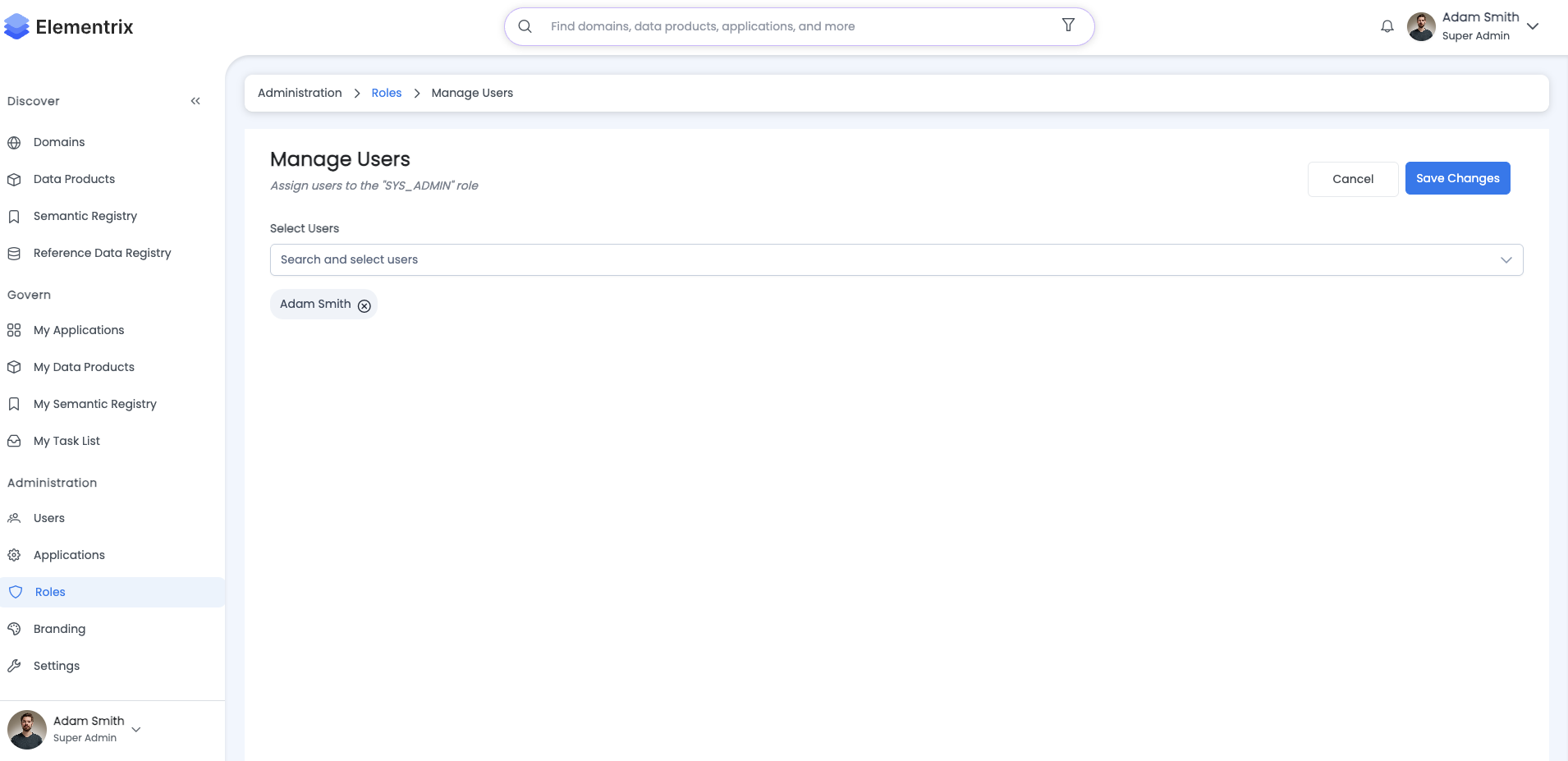
Assign Users to: Finance Data Steward

Search and Select Users:
[Search by name or email...]

Selected Users (15):
☑ john.doe@company.com (Finance Analyst)
☑ jane.smith@company.com (Finance Manager)
☑ bob.johnson@company.com (Accountant)
...

Bulk Assignment:
☑ Notify users via email
☑ Send role documentation
☑ Log in audit trail

[Assign Users] [Cancel]
¶ Permission Inheritance
Role Hierarchy:
Permission Inheritance Model:

ROOT_ADMIN
  │
  ├─ ALL PERMISSIONS (unrestricted)
  │
  └─ SUPER_ADMIN
       │
       ├─ Most permissions (except ROOT modification)
       │
       └─ DATA_GOVERNANCE
            │
            ├─ Product review and approval
            ├─ Compliance monitoring
            └─ Audit access

       └─ REGULAR_DEFAULT_USER
            │
            ├─ Create/own products
            ├─ Request access
            └─ Basic operations

            └─ Custom Roles (additional permissions)
                 │
                 ├─ Finance Data Steward
                 ├─ Marketing Data Owner
                 └─ External Auditor
¶ Domain-Based Permissions
Domain-Specific Role Configuration:

Role: Finance Data Steward

Domain Restrictions:
  Allowed Domains: Finance, Accounting
  Restricted Domains: Marketing, Sales, Operations

Permissions Applied:
  Within Allowed Domains (Finance, Accounting):
    ✓ CREATE_DATA_PRODUCTS
    ✓ EDIT_DATA_PRODUCTS
    ✓ CREATE_SEMANTIC_TERMS
    ✓ EDIT_SEMANTIC_TERMS

  Within Restricted Domains (All Others):
    ✓ VIEW_DATA_PRODUCTS (read-only)
    ✗ CREATE_DATA_PRODUCTS
    ✗ EDIT_DATA_PRODUCTS

Global Permissions (No Domain Restriction):
  ✓ VIEW_ALL_DATA_PRODUCTS
  ✓ REQUEST_ACCESS
  ✓ VIEW_SEMANTIC_TERMS
¶ Role Templates
¶ Pre-configured Templates
Available Role Templates:

1. Data Steward Template
   - Edit and maintain data products
   - Support product owners
   - Respond to user questions
   Permissions: 18 selected

2. Data Owner Template
   - Full product lifecycle management
   - Access request approval
   - Team management
   Permissions: 25 selected

3. Domain Administrator Template
   - Manage domain-specific resources
   - User administration within domain
   - Domain configuration
   Permissions: 22 selected

4. Read-Only Analyst Template
   - View all products
   - Request access
   - Export capabilities
   Permissions: 8 selected

5. Compliance Officer Template
   - Audit and review access
   - Monitor compliance
   - Generate reports
   Permissions: 12 selected

[Use Template] [Customize Template] [Create from Scratch]
¶ Permission Summary Matrix
| Action | App User | Stewards | Owners | Governance | Admin |
|---|---|---|---|---|---|
| View draft products | ✗ | ✓ (assigned) | ✓ (own) | ✓ (all) | ✓ (all) |
| Edit product details | ✗ | ✓ | ✓ | ✗ | ✗* |
| Submit for review | ✗ | ✗ | ✓ | ✗ | ✗ |
| Approve products | ✗ | ✗ | ✗ | ✓ | ✗ |
| Publish products | ✗ | ✗ | ✓ | ✗ | ✗ |
| Discover published | ✓ | ✓ | ✓ | ✓ | ✓ |
| Request access | ✓ | ✓ | ✓ | ✓ | ✓ |
| Grant access | ✗ | ✗ | ✓ | ✗ | ✗* |
| Deprecate products | ✗ | ✗ | ✓ | ✓** | ✗ |
| Retire products | ✗ | ✗ | ✓ | ✓** | ✗ |
| Manage users/roles | ✗ | ✗ | ✗ | ✗ | ✓ |
| Create custom roles | ✗ | ✗ | ✗ | ✗ | ✓ |
| View audit logs | ✗ | ✗ | ✗ | ✓ | ✓ |
*Admin can perform actions if also assigned as owner/steward
**Governance can request, owner executes
¶ Best Practices
¶ For Data Owners
Product Management:
- Assign Stewards Early: Add team members who can help with product creation
- Clear Ownership: Ensure one clear owner per product
- Regular Reviews: Monitor product usage and user feedback
- Plan Deprecation: Provide adequate notice and migration support
Access Management:
- Review Requests Promptly: Don't let requests sit in queue
- Verify Business Need: Ensure access requests are justified
- Monitor Usage: Track who accesses your products
- Revoke Unused Access: Remove access that's no longer needed
¶ For Data Stewards
Collaboration:
- Stay Updated: Keep documentation current
- User Support: Respond promptly to user questions
- Quality Focus: Ensure data quality and completeness
- Collaboration: Work closely with owners and governance
Documentation:
- Maintain Examples: Provide clear usage examples
- Update FAQs: Document common questions
- Version Notes: Track changes between versions
- Contact Information: Keep support contacts current
¶ For Data Governance
Review Process:
- Timely Reviews: Complete reviews within SLA (typically 2-3 business days)
- Clear Feedback: Provide actionable feedback for improvements
- Consistency: Apply standards consistently across products
- Monitoring: Track compliance and usage patterns
Standards Enforcement:
- Document Standards: Maintain clear governance policies
- Communicate Expectations: Ensure owners understand requirements
- Provide Templates: Offer templates for common scenarios
- Regular Audits: Periodically review published products
¶ For Admins
Principle of Least Privilege:
- Minimal Access: Grant only necessary permissions
- Use Domain Restrictions: Limit permissions to specific domains
- Regular Reviews: Audit role assignments quarterly
- Remove Unused Roles: Clean up inactive custom roles
Role Management:
- Support Role: Focus on enabling teams, not doing their work
- Monitoring: Track system health and usage
- Documentation: Keep admin procedures documented
- Training: Ensure admins understand RBAC model
Security:
- Least Privilege: Avoid modifying products directly
- Audit Trails: Monitor all administrative actions
- Role Separation: Don't assign ROOT_ADMIN for routine tasks
- Regular Reviews: Quarterly role and permission audits
¶ Common Scenarios
¶ Scenario 1: Team Member Leaves
If Data Owner Leaves:
Process:
1. Admin assigns new owner from owner's team
2. New owner reviews and updates product details
3. Governance team notified of ownership change
4. Access requests re-routed to new owner
5. Documentation updated with new contact

Timeline: 1-2 business days
Impact: Minimal (stewards maintain continuity)
If Data Steward Leaves:
Process:
1. Owner removes steward from product
2. Owner assigns replacement steward if needed
3. No governance notification required
4. Documentation updated if steward was primary contact

Timeline: Same day
Impact: None (owner maintains control)
If Admin Leaves:
Process:
1. ROOT_ADMIN assigns new SUPER_ADMIN
2. Transfer administrative responsibilities
3. Update system documentation
4. Revoke access from departed admin
5. Audit recent admin actions

Timeline: 1 business day
Impact: Minimal (other admins cover)
¶ Scenario 2: Emergency Access
Critical Bug in Published Product:
Process:
1. Owner can create new version immediately
2. Stewards help with urgent fixes
3. Governance fast-tracks review for critical fixes
4. Admin supports technical troubleshooting
5. Emergency patch published within hours

Permissions Used:
- Owner: CREATE_NEW_VERSION, SUBMIT_FOR_REVIEW
- Governance: FAST_TRACK_APPROVAL
- Admin: TECHNICAL_SUPPORT

Timeline: 2-4 hours for critical fixes
SLA: 24 hours for high-priority issues
Data Access Emergency:
Process:
1. Owner can grant temporary emergency access
2. Governance notified of emergency grant
3. Access automatically revoked after time period
4. Audit trail maintained
5. Post-incident review

Permissions Used:
- Owner: GRANT_EMERGENCY_ACCESS
- Governance: VIEW_EMERGENCY_GRANTS

Duration: 24-72 hours (configurable)
Approval: Post-hoc governance review
¶ Scenario 3: Compliance Violation
Discovery of Violation:
Process:
1. Governance can immediately unpublish product
2. Owner notified of violation
3. Existing access suspended
4. Product must be fixed and re-approved
5. Incident documented and reviewed

Permissions Used:
- Governance: EMERGENCY_UNPUBLISH, SUSPEND_ACCESS
- Admin: NOTIFY_STAKEHOLDERS, AUDIT_ACCESS

Timeline:
- Immediate: Product unpublished
- 1-2 hours: All stakeholders notified
- 1-2 days: Root cause analysis
- 3-5 days: Remediation and re-approval
¶ Scenario 4: External Auditor Access
Create Role: External Auditor
Requirements:
- Read-only access to all data products
- Access to audit logs
- Cannot create or modify anything
- Limited to audit-related domains
- Temporary (audit period only)

Permissions:
☑ VIEW_ALL_DATA_PRODUCTS
☑ VIEW_SEMANTIC_TERMS
☑ VIEW_DATA_MODELS
☑ VIEW_AUDIT_LOGS
☑ EXPORT_DATA (for audit reports)
☐ CREATE_DATA_PRODUCTS
☐ EDIT_DATA_PRODUCTS
☐ DELETE_DATA_PRODUCTS
☐ APPROVE_ACCESS_REQUESTS

Domain Restrictions:
- Finance
- Accounting
- Compliance

Duration: Temporary (audit period only)
Auto-Expire: 2025-03-31

[Create Role] [Assign Users]
¶ Scenario 5: Domain-Specific Data Owner
Role: Marketing Data Owner
Purpose:
Full control over marketing domain data products with ability
to create, manage, and publish marketing-related data.

Permissions:
☑ VIEW_ALL_DATA_PRODUCTS
☑ CREATE_DATA_PRODUCTS (Marketing only)
☑ EDIT_OWN_DATA_PRODUCTS
☑ DELETE_OWN_DATA_PRODUCTS
☑ PUBLISH_DATA_PRODUCTS (after approval)
☑ APPROVE_ACCESS_REQUESTS (own products)
☑ CREATE_SEMANTIC_TERMS (Marketing domain)
☑ ASSIGN_STEWARDS (to own products)

Domain Restrictions:
- Allowed: Marketing
- View-Only: Sales, Customer Service
- Restricted: Finance, HR

Use Case:
Marketing team needs autonomy over marketing data while
maintaining governance controls.

[Save Role Configuration]
¶ Role Management Best Practices
¶ Principle of Least Privilege
Guidelines:
- Grant minimum necessary permissions
- Use domain restrictions when possible
- Create specific roles for specific needs
- Regularly review and audit permissions
- Remove permissions when no longer needed
Example Scenario:
Scenario: New Finance Analyst

❌ Bad Approach:
- Assign SUPER_ADMIN role
- Full access to everything
- Security risk
- Violates least privilege

✓ Good Approach:
- Assign REGULAR_DEFAULT_USER (default)
- Assign Finance Data Steward (domain-specific)
- Grant access to specific finance products
- Review permissions after 90 days
¶ Role Naming Conventions
Best Practices:
- Use descriptive names
- Include domain or function
- Consistent naming pattern
- Avoid generic names
Examples:
✓ Good Names:
- Finance_Data_Steward
- Marketing_Data_Owner
- Compliance_Auditor
- Analytics_Team_Member
- External_Auditor_2025

❌ Bad Names:
- User1
- Team_Role
- Special_Access
- Admin2
- TempRole
¶ Regular Role Audits
Quarterly Role Audit:
Role Audit Checklist:

For Each Role:
1. Review assigned users
   - Are all assignments still valid?
   - Remove inactive users
   - Verify continued business need

2. Review permissions
   - Are permissions still appropriate?
   - Remove unnecessary permissions
   - Add new permissions if needed

3. Check usage
   - Are permissions being used?
   - Remove unused permissions
   - Identify permission gaps

4. Update documentation
   - Document changes
   - Update role descriptions
   - Notify affected users

5. Security review
   - Check for over-privileged roles
   - Verify domain restrictions
   - Review temporary role expirations

[Generate Audit Report] [Schedule Next Review]
¶ Troubleshooting
¶ Cannot Perform Action
Problem: User receives "Permission Denied" error
Solutions:
- Verify user has appropriate role
- Check if action is available in current lifecycle phase
- Confirm domain restrictions (if applicable)
- Check if product is assigned to user
- Contact administrator to review permissions
¶ Role Assignment Not Working
Problem: User assigned role but permissions not applied
Solutions:
- User may need to log out and log back in
- Verify role is active (not disabled)
- Check for conflicting role restrictions
- Verify role has permissions configured
- Check system logs for errors
¶ Cannot Delete Custom Role
Problem: Delete button disabled for custom role
Solutions:
- Verify no users are assigned to role
- Remove all user assignments first
- Check if role is referenced in workflows
- Verify you have MANAGE_ROLES permission
- Contact ROOT_ADMIN if built-in role
¶ Next Steps
- Learn about Discovery and Access
- Review Data Product Lifecycle
- Explore Governance Approval
- Configure Managing Users
- Set up SSO for role assignment
¶ Related Pages
- Data Products Overview
- Data Product Lifecycle
- Governance Approval Workflow
- Administration Overview
- Managing Users
- Home
Version: 1.0
Last Updated: 2025-01-27
Maintained By: Elementrix Documentation Team