¶ Requesting Access to Data Products
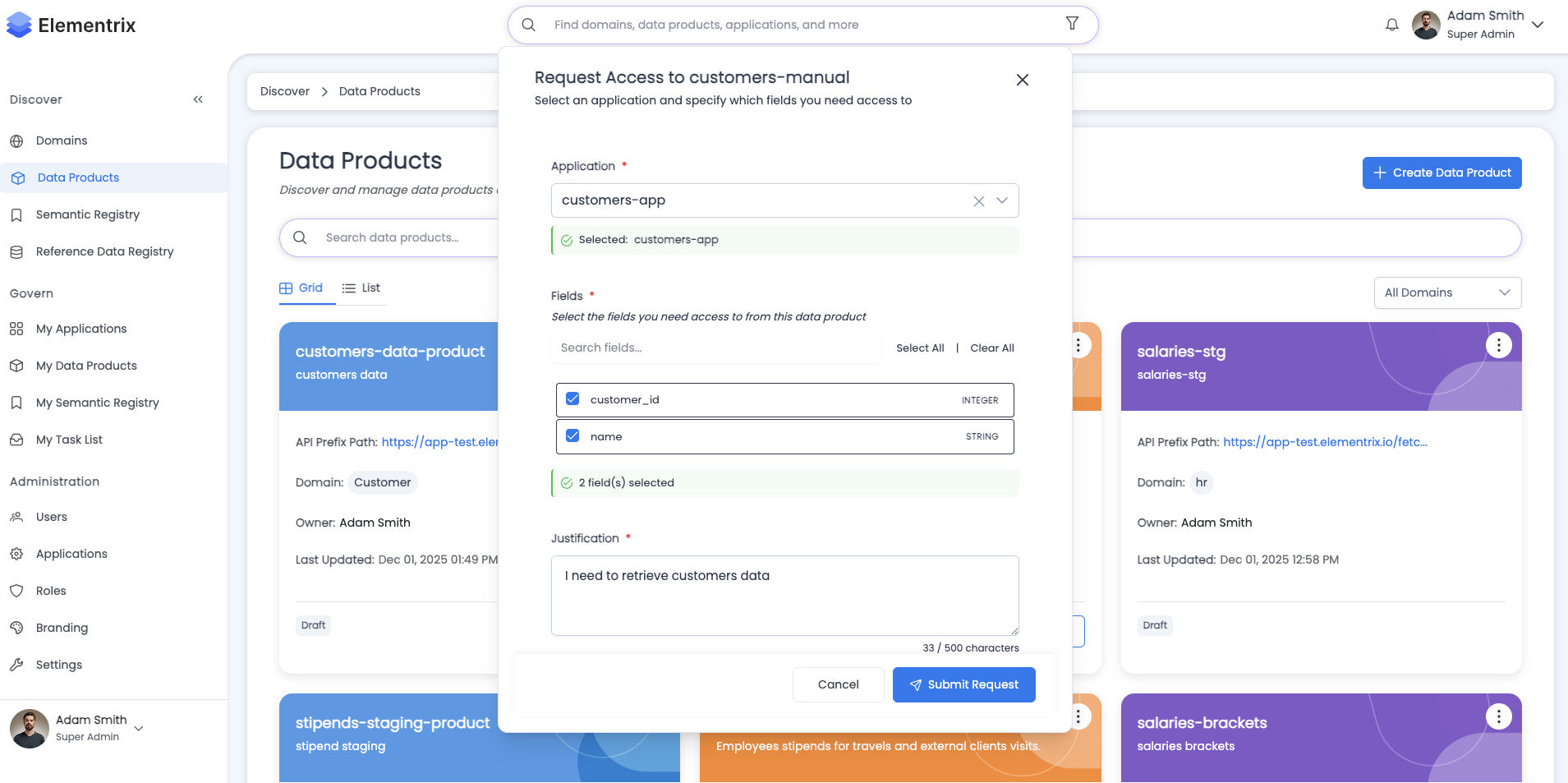
Applications require explicit approval to access data products. This guide covers the complete process of requesting access to data products, tracking approval workflows, and managing access requests.
¶ Overview
What is an Access Request?
An access request is a formal request submitted by an application to gain access to specific fields in a published data product. Access requests:
- Must specify which fields to access (full or partial)
- Require justification explaining why access is needed
- Go through a multi-step approval workflow
- Are tracked and auditable for governance compliance
Access Request Lifecycle:
Request Created → In Progress → (Multiple Approval Steps) → Approved/Rejected/Cancelled
¶ Prerequisites
Before requesting access to a data product:
Application Setup:
- ✓ Application must be created and configured
- ✓ Application status must be "enabled"
- ✓ You must be an application owner or contributor
Data Product Requirements:
- ✓ Data product must have status "PUBLISHED"
- ✓ Data product must have defined fields/schema
- ✓ Approval workflow must be configured for the data product
User Permissions:
- Ability to view published data products
- Permission to create access requests
- Application contributor or owner role
¶ The Complete Workflow
¶ High-Level Process
┌──────────────────┐
│ 1. Select        │
│    Application   │
└────────┬─────────┘
         │
         ▼
┌──────────────────┐
│ 2. Browse Data   │
│    Products      │
└────────┬─────────┘
         │
         ▼
┌──────────────────┐
│ 3. Select Fields │
│    (Full/Partial)│
└────────┬─────────┘
         │
         ▼
┌──────────────────┐
│ 4. Provide       │
│    Justification │
└────────┬─────────┘
         │
         ▼
┌──────────────────┐
│ 5. Submit        │
│    Request       │
└────────┬─────────┘
         │
         ▼
┌──────────────────┐
│ 6. Multi-Step    │
│    Approvals     │
└────────┬─────────┘
         │
         ▼
┌──────────────────┐
│ 7. Access        │
│    Granted       │
└──────────────────┘
¶ Approval Workflow Steps
Each access request goes through configured approval steps:
Step 1: Data Owner Review
  Assignee: john.doe@company.com
  Status: Pending → Approved
  Comments: "Access approved for analytics use"
         ↓

Step 2: Data Steward Review
  Assignee: jane.smith@company.com
  Status: Pending → Approved
  Comments: "Verified compliance requirements"
         ↓

Step 3: Security Review
  Assignee: security.team@company.com
  Status: Pending → Approved
  Comments: "Security clearance granted"
         ↓

Final Status: APPROVED
Application granted access to requested fields
¶ Requesting Access: Step-by-Step Guide
¶ Step 1: Navigate to Application
From the applications list, select your application:
My Applications:

┌─────────────────────────────────────────────────┐
│ Sales Analytics App                              │
│ Client ID: sales-analytics-app-2024              │
│ Status: ✓ Enabled                                │
│ API Calls Today: 1,234                           │
│ Assigned Products: 3                             │
│                                                  │
│ [View Details] [Request Access] [Manage Keys]   │
└─────────────────────────────────────────────────┘

Click [Request Access] button
¶ Step 2: Select Data Product
Browse published data products and select one:
Request Access to Data Product

Search Data Products: [________________]  [🔍 Search]

Available Data Products (Published Only):

┌───────────────────────────────────────────────────┐
│ ☐ Customer Demographics                          │
│   Domain: Customer Service                       │
│   Owner: Alice Williams                          │
│   Fields: 15                                     │
│   Description: Customer profile and demographic  │
│                information                        │
└───────────────────────────────────────────────────┘

┌───────────────────────────────────────────────────┐
│ ☑ Sales Transactions                              │
│   Domain: Sales                                  │
│   Owner: Bob Johnson                             │
│   Fields: 22                                     │
│   Description: Complete sales transaction records│
└───────────────────────────────────────────────────┘

┌───────────────────────────────────────────────────┐
│ ☐ Product Inventory                              │
│   Domain: Supply Chain                           │
│   Owner: Sarah Chen                              │
│   Fields: 18                                     │
│   Description: Real-time inventory levels        │
└───────────────────────────────────────────────────┘

[Cancel] [Next: Select Fields]
Search Features:
- Real-time search with 300ms debounce
- Searches product name and description
- Filters show only PUBLISHED products
- Single product selection per request
¶ Step 3: Select Fields
Choose which fields to access:
Select Fields for: Sales Transactions

Access Level:
  ○ Full Access (All 22 fields)
  ● Partial Access (Select specific fields)

Available Fields:

Core Transaction Fields:
  ☑ transaction_id        (Integer)
  ☑ transaction_date      (Timestamp)
  ☑ customer_id           (Integer)
  ☑ product_id            (Integer)
  ☑ quantity              (Integer)
  ☑ unit_price            (Decimal)
  ☑ total_amount          (Decimal)
  ☐ discount_applied      (Decimal)

Payment Information:
  ☑ payment_method        (String)
  ☐ payment_status        (String)
  ☐ payment_processor     (String)

Customer Details:
  ☐ customer_name         (String)
  ☐ customer_email        (String)
  ☐ customer_phone        (String)

Audit Fields:
  ☑ created_at            (Timestamp)
  ☑ updated_at            (Timestamp)
  ☐ created_by            (String)
  ☐ updated_by            (String)

[Select All] [Deselect All]

Selected: 10 of 22 fields

[Back] [Next: Justification]
Field Selection Options:
- Full Access: All fields in the data product
- Partial Access: Select individual fields
- Fields display data types for reference
- Must select at least one field
¶ Step 4: Provide Justification
Explain why access is needed:
Justification

Data Product: Sales Transactions
Selected Fields: 10 fields
Access Level: Partial

Justification (Required):
┌──────────────────────────────────────────────────┐
│ Our Sales Analytics application requires access  │
│ to transaction data to generate quarterly sales  │
│ reports and trend analysis. We need core         │
│ transaction fields and payment methods for       │
│ revenue tracking, but do not require customer    │
│ PII fields (name, email, phone) as we will join  │
│ with anonymized customer segments.               │
│                                                   │
│ This access supports the Q1 2025 Executive       │
│ Dashboard initiative (Project ID: EXEC-2025-01). │
│                                                   │
│ Data will be accessed via scheduled batch jobs   │
│ running daily at 2:00 AM UTC. Estimated data     │
│ volume: ~50,000 transactions per day.            │
└──────────────────────────────────────────────────┘

Characters: 485 / 2000

[Back] [Submit Request]
Justification Best Practices:
- Explain the business use case clearly
- Reference specific projects or initiatives
- Describe how data will be used
- Mention access patterns (batch vs real-time)
- Include compliance or security considerations
¶ Step 5: Review and Submit
Review your request before submitting:
Review Access Request

Application: Sales Analytics App
Data Product: Sales Transactions
Domain: Sales

Selected Fields (10):
  ✓ transaction_id
  ✓ transaction_date
  ✓ customer_id
  ✓ product_id
  ✓ quantity
  ✓ unit_price
  ✓ total_amount
  ✓ payment_method
  ✓ created_at
  ✓ updated_at

Access Level: Partial (10 of 22 fields)

Justification:
  Our Sales Analytics application requires access to
  transaction data to generate quarterly sales reports...
  [View Full Justification]

Approval Workflow:
  This request will go through 3 approval steps:
  1. Data Owner Review (Bob Johnson)
  2. Data Steward Review (Jane Smith)
  3. Security Review (Security Team)

⚠️ Note: You will receive email notifications as your
   request progresses through the approval workflow.

[Back] [Cancel] [Submit Request]
¶ Step 6: Request Submitted
After submission, you receive confirmation:
✓ Access Request Submitted Successfully!

Request Details:
  Request ID: #12345
  Data Product: Sales Transactions
  Status: In Progress
  Submitted: 2025-01-27 10:30 UTC

Approval Progress:

Step 1 of 3: Data Owner Review
  Assignee: Bob Johnson (bob.johnson@company.com)
  Status: ⏳ Pending

Step 2 of 3: Data Steward Review
  Assignee: Jane Smith (jane.smith@company.com)
  Status: ⌛ Waiting

Step 3 of 3: Security Review
  Assignee: Security Team (security.team@company.com)
  Status: ⌛ Waiting

Next Steps:
1. You will receive email when each step is reviewed
2. Track progress in "My Requests" page
3. Approvers can approve or reject at each step
4. If approved at all steps, access is granted automatically

[View Request Details] [Back to Applications]
¶ Approval Workflow
¶ Multi-Step Approval Process
Each data product has a configured approval workflow with sequential steps:
Approval Workflow Configuration:

┌─────────────────────────────────────────────────┐
│ Step 1: Data Owner Review                       │
│   Order: 1                                      │
│   Type: INDIVIDUAL                              │
│   Assignee: Bob Johnson                         │
│   Title: "Data Owner Review"                    │
├─────────────────────────────────────────────────┤
│ Step 2: Data Steward Review                     │
│   Order: 2                                      │
│   Type: INDIVIDUAL                              │
│   Assignee: Jane Smith                          │
│   Title: "Data Steward Compliance Review"       │
├─────────────────────────────────────────────────┤
│ Step 3: Security Review                         │
│   Order: 3                                      │
│   Type: INDIVIDUAL                              │
│   Assignee: Security Team                       │
│   Title: "Security and Access Control Review"   │
└─────────────────────────────────────────────────┘
¶ Approver Actions
Approvers receive requests in their inbox and can:
1. Approve the Request:
Access Request #12345

Data Product: Sales Transactions
Requester: John Doe (john.doe@company.com)
Application: Sales Analytics App

Requested Fields: 10 fields
  ✓ transaction_id, transaction_date, customer_id...

Justification:
  Our Sales Analytics application requires access to
  transaction data to generate quarterly sales reports...

Current Step: Data Owner Review (Step 1 of 3)
Assigned to: You

Decision:
  ● Approve
  ○ Reject

Comments (Optional):
┌──────────────────────────────────────────────────┐
│ Access approved for analytics use. Please ensure │
│ data is handled according to company data policy │
│ DP-2024-15.                                      │
└──────────────────────────────────────────────────┘

[Cancel] [Submit Decision]
2. Reject the Request:
Decision:
  ○ Approve
  ● Reject

Comments (Required for Rejection):
┌──────────────────────────────────────────────────┐
│ Access request rejected due to incomplete        │
│ justification. Please provide specific project   │
│ reference and data retention policy information. │
│                                                   │
│ Contact me for clarification before resubmitting.│
└──────────────────────────────────────────────────┘

[Cancel] [Submit Decision]
¶ Approval Step Statuses
Each approval step has a status:
- PENDING: Waiting for approver to review
- APPROVED: Approver approved the request
- REJECTED: Approver rejected the request
¶ Overall Request Status
The access request has an overall status:
- IN_PROGRESS: Request is being reviewed, going through approval steps
- APPROVED: All approval steps approved, access granted
- REJECTED: One or more approval steps rejected, access denied
- CANCELLED: Requester cancelled the request
¶ Monitoring Request Status
¶ View in "My Requests" (Outbox)
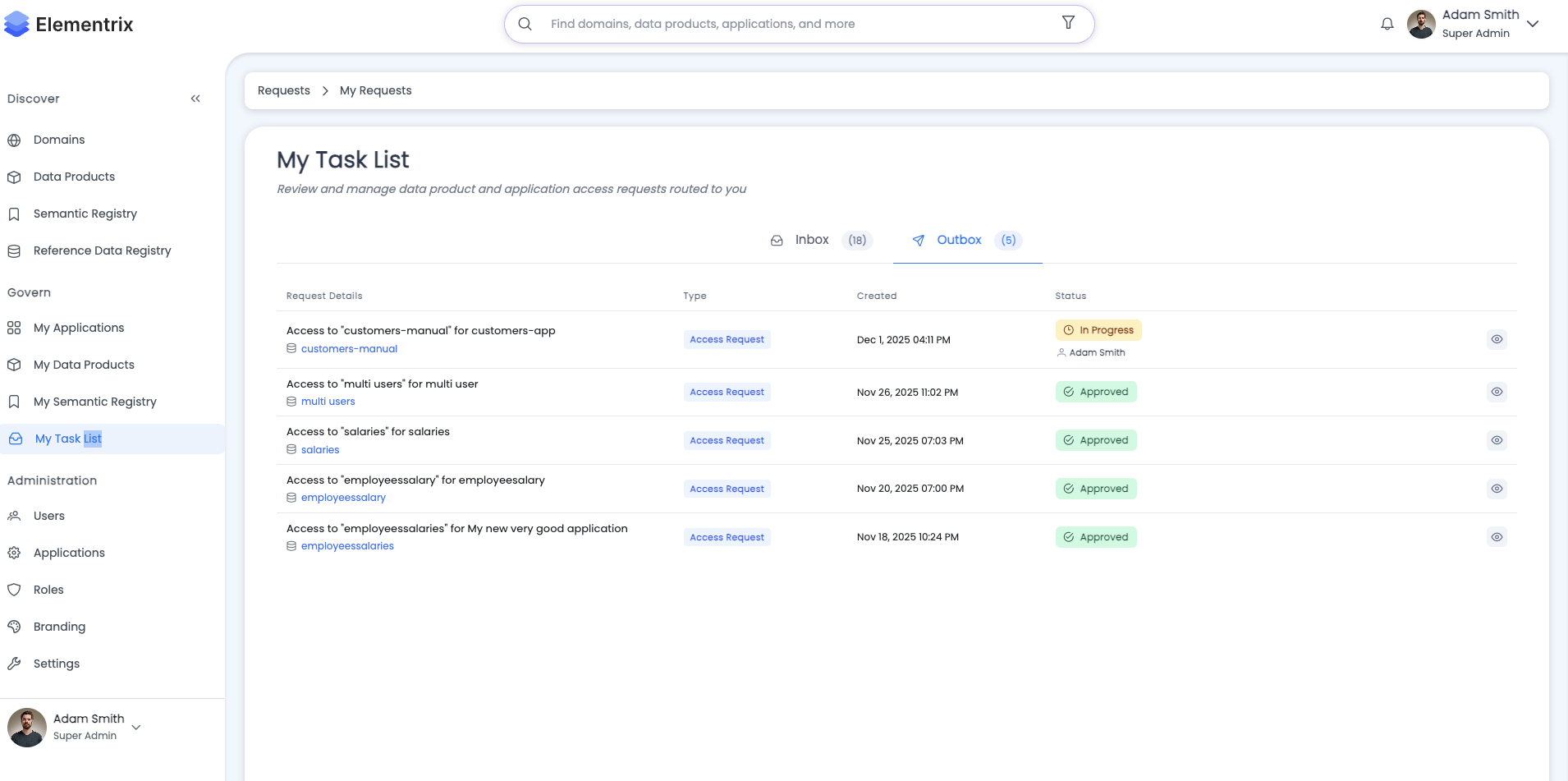
Track your submitted requests:
My Requests → Outbox

┌─────────────────────────────────────────────────────┐
│ Request #12345                                       │
│ Sales Transactions                                   │
│ Domain: Sales                                        │
│ Status: In Progress (Step 2 of 3)                   │
│ Submitted: Jan 27, 2025 10:30 AM                    │
│                                                      │
│ Progress: ████████████░░░░░░░ 66%                   │
│                                                      │
│ Approval Steps:                                      │
│   ✓ Step 1: Data Owner Review (Approved)            │
│   ⏳ Step 2: Data Steward Review (Pending)          │
│   ⌛ Step 3: Security Review (Waiting)              │
│                                                      │
│ [View Details] [Cancel Request]                     │
└─────────────────────────────────────────────────────┘
¶ Request Details View
Click "View Details" to see complete information:
Access Request #12345

Overview | Approval History | Activity Log

─────────────────────────────────────────────────────────
Overview Tab:
─────────────────────────────────────────────────────────

Request Information:
  Request ID: #12345
  Status: In Progress
  Created: 2025-01-27 10:30 UTC
  Last Updated: 2025-01-27 14:15 UTC
  Progress: 66% (Step 2 of 3)

Application Details:
  Name: Sales Analytics App
  Client ID: sales-analytics-app-2024
  Owner: John Doe

Data Product Details:
  Name: Sales Transactions
  Domain: Sales
  Owner: Bob Johnson
  Total Fields: 22

Access Details:
  Access Level: Partial
  Requested Fields: 10 fields
    - transaction_id (Integer)
    - transaction_date (Timestamp)
    - customer_id (Integer)
    - product_id (Integer)
    - quantity (Integer)
    - unit_price (Decimal)
    - total_amount (Decimal)
    - payment_method (String)
    - created_at (Timestamp)
    - updated_at (Timestamp)

Justification:
  Our Sales Analytics application requires access to
  transaction data to generate quarterly sales reports
  and trend analysis. We need core transaction fields
  and payment methods for revenue tracking, but do not
  require customer PII fields (name, email, phone) as
  we will join with anonymized customer segments.

  This access supports the Q1 2025 Executive Dashboard
  initiative (Project ID: EXEC-2025-01).

  Data will be accessed via scheduled batch jobs running
  daily at 2:00 AM UTC. Estimated data volume: ~50,000
  transactions per day.

Approval Workflow:

  Step 1: Data Owner Review
    Assignee: Bob Johnson (bob.johnson@company.com)
    Status: ✓ Approved
    Reviewed: 2025-01-27 11:45 UTC
    Comments: "Access approved for analytics use. Please
              ensure data is handled according to company
              data policy DP-2024-15."

  Step 2: Data Steward Review
    Assignee: Jane Smith (jane.smith@company.com)
    Status: ⏳ Pending Review
    Assigned: 2025-01-27 11:45 UTC
    Comments: -

  Step 3: Security Review
    Assignee: Security Team (security.team@company.com)
    Status: ⌛ Waiting for Previous Steps
    Comments: -

Available Actions:
  [Cancel Request]

─────────────────────────────────────────────────────────
Approval History Tab:
─────────────────────────────────────────────────────────

2025-01-27 11:45 UTC
  ✓ Step 1 Approved
  Approver: Bob Johnson
  Comments: "Access approved for analytics use. Please
            ensure data is handled according to company
            data policy DP-2024-15."

2025-01-27 10:30 UTC
  📝 Request Created
  Requester: John Doe
  Application: Sales Analytics App
  Data Product: Sales Transactions

─────────────────────────────────────────────────────────
Activity Log Tab:
─────────────────────────────────────────────────────────

2025-01-27 14:15 UTC
  📧 Email Notification Sent
  Recipient: jane.smith@company.com
  Subject: "Access Request #12345 Pending Your Review"

2025-01-27 11:45 UTC
  ✅ Approval Step Completed
  Step: Data Owner Review
  Decision: Approved
  Approver: Bob Johnson

2025-01-27 10:35 UTC
  📧 Email Notification Sent
  Recipient: bob.johnson@company.com
  Subject: "Access Request #12345 Pending Your Review"

2025-01-27 10:30 UTC
  ➕ Request Created
  Requester: John Doe
  Fields Selected: 10
  Access Level: Partial
¶ Managing Requests
¶ Cancelling a Request
You can cancel your request if it's still IN_PROGRESS:
Cancel Access Request

⚠️ Warning: This action cannot be undone!

Request Information:
  Request ID: #12345
  Data Product: Sales Transactions
  Status: In Progress (Step 2 of 3)
  Created: Jan 27, 2025 10:30 AM

Current Progress:
  ✓ Step 1: Data Owner Review (Approved)
  ⏳ Step 2: Data Steward Review (Pending)
  ⌛ Step 3: Security Review (Waiting)

Are you sure you want to cancel this request?

  ○ Cancel the request
    The request will be cancelled and approvers will be
    notified. You can submit a new request anytime.

[Back] [Cancel Request]
Cancellation Rules:
- Only requester can cancel
- Can only cancel requests with status IN_PROGRESS
- Cannot cancel APPROVED, REJECTED, or already CANCELLED requests
- Cancellation sends email notifications to all approvers
¶ Resubmitting After Rejection
If your request is rejected, you can submit a new request:
Request #12345 - REJECTED

Data Product: Sales Transactions
Status: ✗ Rejected at Step 2 of 3

Rejection Details:
  Step: Data Steward Review
  Approver: Jane Smith
  Date: 2025-01-27 15:20 UTC
  Comments: "Access request rejected due to incomplete
            justification. Please provide specific project
            reference and data retention policy information.

            Contact me for clarification before resubmitting."

What would you like to do?

  [Submit New Request] [Contact Approver] [Back]
Resubmission Best Practices:
- Review rejection comments carefully
- Contact approver if clarification needed
- Address all concerns in new justification
- Provide additional documentation if required
- Submit as a new request (no editing of rejected requests)
¶ Best Practices
¶ Writing Good Justifications
Good Justification Example:
Our Customer Analytics application requires access to
customer demographic data to:

1. Generate monthly customer segmentation reports for
   the Marketing team (Project: MKTG-2025-Q1)

2. Build predictive models for customer churn prevention
   (Initiative: CX-IMPROVE-2025)

3. Support compliance reporting for GDPR Article 30
   record-keeping requirements

Data Usage:
- Access pattern: Batch processing, daily at 3:00 AM UTC
- Volume: ~100,000 customer records
- Retention: 90 days in analytics warehouse
- Security: Data encrypted at rest and in transit

Compliance:
- Data will be handled per Data Protection Policy DP-2024-08
- PII fields will be masked for non-production environments
- Access logged and audited per Security Policy SEC-2024-12

Contact: analytics-team@company.com for questions
Poor Justification Example:
Need data for analytics.
Justification Checklist:
- ✓ Explain specific business use case
- ✓ Reference projects or initiatives
- ✓ Describe data usage patterns
- ✓ Include compliance considerations
- ✓ Specify data retention period
- ✓ Mention security measures
- ✓ Provide contact information
¶ Selecting Fields Wisely
Field Selection Strategy:
-
Principle of Least Privilege: Request only fields you need
- Don't select "Full Access" unless truly necessary
- Review each field and its purpose
- Consider privacy and security implications
-
Group Related Fields:
- Core business fields (IDs, dates, amounts)
- Operational fields (status, timestamps)
- Audit fields (created_by, updated_at)
- Sensitive fields (PII, financial)
-
Document Field Usage:
Requested Fields (10):

Transaction Core (7 fields):
- transaction_id: Primary key for joining
- transaction_date: Time-series analysis
- customer_id: Foreign key for customer segments
- product_id: Product category analysis
- quantity: Volume metrics
- unit_price: Pricing trends
- total_amount: Revenue calculations

Audit Trail (2 fields):
- created_at: Data freshness tracking
- updated_at: Change detection

Metadata (1 field):
- payment_method: Payment analytics

Excluded Fields:
- customer_name, customer_email, customer_phone:
  Not needed as we join with anonymized segments
- discount_applied, payment_status, payment_processor:
  Out of scope for current analytics
¶ Managing Approval Workflows
For Requesters:
- Plan Ahead: Submit requests well before needed
- Provide Context: Give approvers all information needed
- Be Responsive: Answer approver questions quickly
- Track Progress: Monitor request status regularly
- Resubmit Properly: Address all rejection comments
For Approvers:
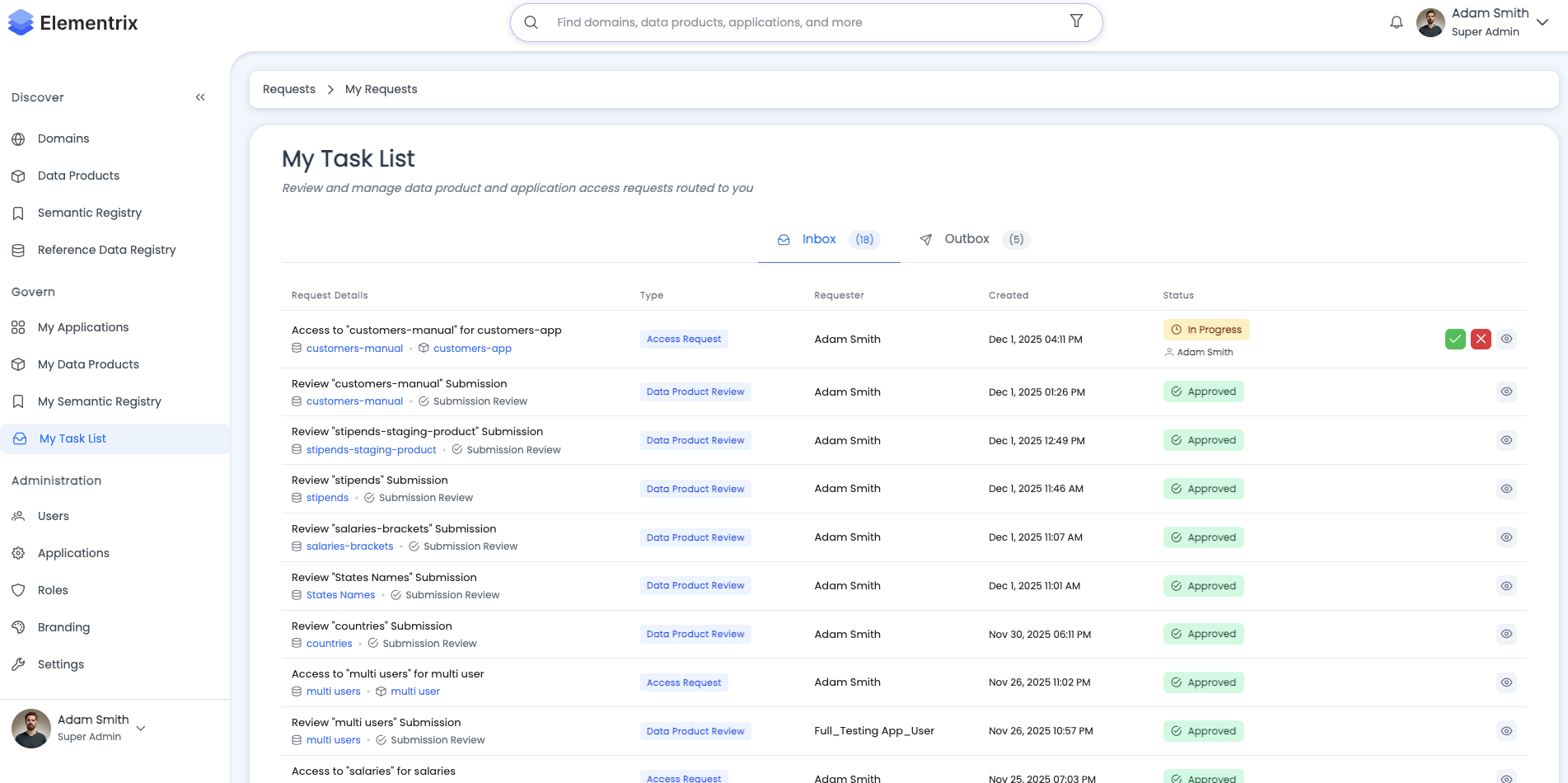
- Review Promptly: Don't let requests sit in queue
- Be Specific: Provide clear approval/rejection reasons
- Ask Questions: Contact requester if clarification needed
- Document Decisions: Add meaningful comments
- Consider Impact: Balance security with business needs
¶ Troubleshooting
¶ Cannot Find Data Product
Problem: Data product not appearing in selection list
Solutions:
- ✓ Verify data product status is "PUBLISHED"
- Only published products can be requested
- Check with data product owner
- ✓ Check search filters and query
- Clear search box
- Refresh the page
- ✓ Verify you have view permissions
- Contact administrator if access denied
- ✓ Confirm approval workflow is configured
- Data products without workflows cannot be requested
¶ Request Stuck in Progress
Problem: Request not progressing through approval steps
Solutions:
- ✓ Check if current approver is aware of request
- Verify email notifications were sent
- Contact approver directly
- ✓ Verify approver account status
- Approver must be active user
- Check if approver is on leave
- ✓ Review approval workflow configuration
- Ensure all steps have valid assignees
- Contact data product owner if workflow issues
- ✓ Check for system notifications
- Look for error messages in request details
- Contact support if technical issues
¶ Cannot Select Fields
Problem: Field selection checkboxes disabled or not appearing
Solutions:
- ✓ Verify data product has schema defined
- Products must have fields to request
- Contact data product owner
- ✓ Refresh the page
- Clear browser cache if needed
- ✓ Try different browser
- Check for JavaScript errors in console
- ✓ Verify application permissions
- Ensure you're an application contributor
¶ Request Rejected Immediately
Problem: Request rejected without going through all steps
Solutions:
- ✓ Review rejection comments carefully
- Address all concerns mentioned
- Contact approver for clarification
- ✓ Check if policy violations occurred
- Verify justification meets requirements
- Ensure field selection is appropriate
- ✓ Verify application eligibility
- Application must be enabled
- Check if application is restricted
- ✓ Resubmit with corrections
- Update justification
- Adjust field selection if needed
¶ Cannot Cancel Request
Problem: Cancel button disabled or not working
Solutions:
- ✓ Check request status
- Can only cancel IN_PROGRESS requests
- Cannot cancel APPROVED, REJECTED, or CANCELLED requests
- ✓ Verify you are the requester
- Only requester can cancel
- Contact administrator if ownership issue
- ✓ Refresh the page
- Request may have been updated
- ✓ Check for errors in browser console
- Report technical issues to support
¶ Email Notifications Not Received
Problem: Not receiving request status emails
Solutions:
- ✓ Check spam/junk folder
- Add Elementrix email to safe senders
- ✓ Verify email address in profile
- Update user profile if incorrect
- ✓ Check notification preferences
- Ensure notifications are enabled
- ✓ Contact administrator
- Verify email server configuration
- Check system logs for delivery errors
¶ Related Pages
- Applications Management - Creating and managing OAuth applications
- My Requests - Managing your inbox and outbox
- Data Products Overview - Understanding data products
- Roles and Privileges - User roles and permissions
- Discovery and Access - Finding data products
- Home
¶ Next Steps
- Learn about Applications Management to create OAuth applications
- Explore My Requests to manage your requests and approvals
- Review Data Products Overview to understand what you can access
- Check Roles and Privileges to understand access control
Questions? Contact your Elementrix administrator or data governance team.