¶ Import and Export Data Products
¶ Introduction
The Elementrix platform provides comprehensive import and export functionality for data products, enabling users to:
- Export complete data products with all metadata and configurations
- Import entire domains with data products, users, and business glossary terms
This feature streamlines data product management, facilitates migration between environments, and enables bulk operations while maintaining data integrity and security.
¶ Who Can Use This Feature
Import and export operations require specific role-based permissions:
- System Owner (SYS_OWNER): Full access to all import/export operations
- System Administrator (SYS_ADMIN): Full access to all import/export operations
- Data Product Owners/Admins: Can upload data to their own products
- Regular Users: Read-only access to exported data products
¶ Feature Overview
The platform supports those primary import/export workflows:
¶ 1. Export Data Product
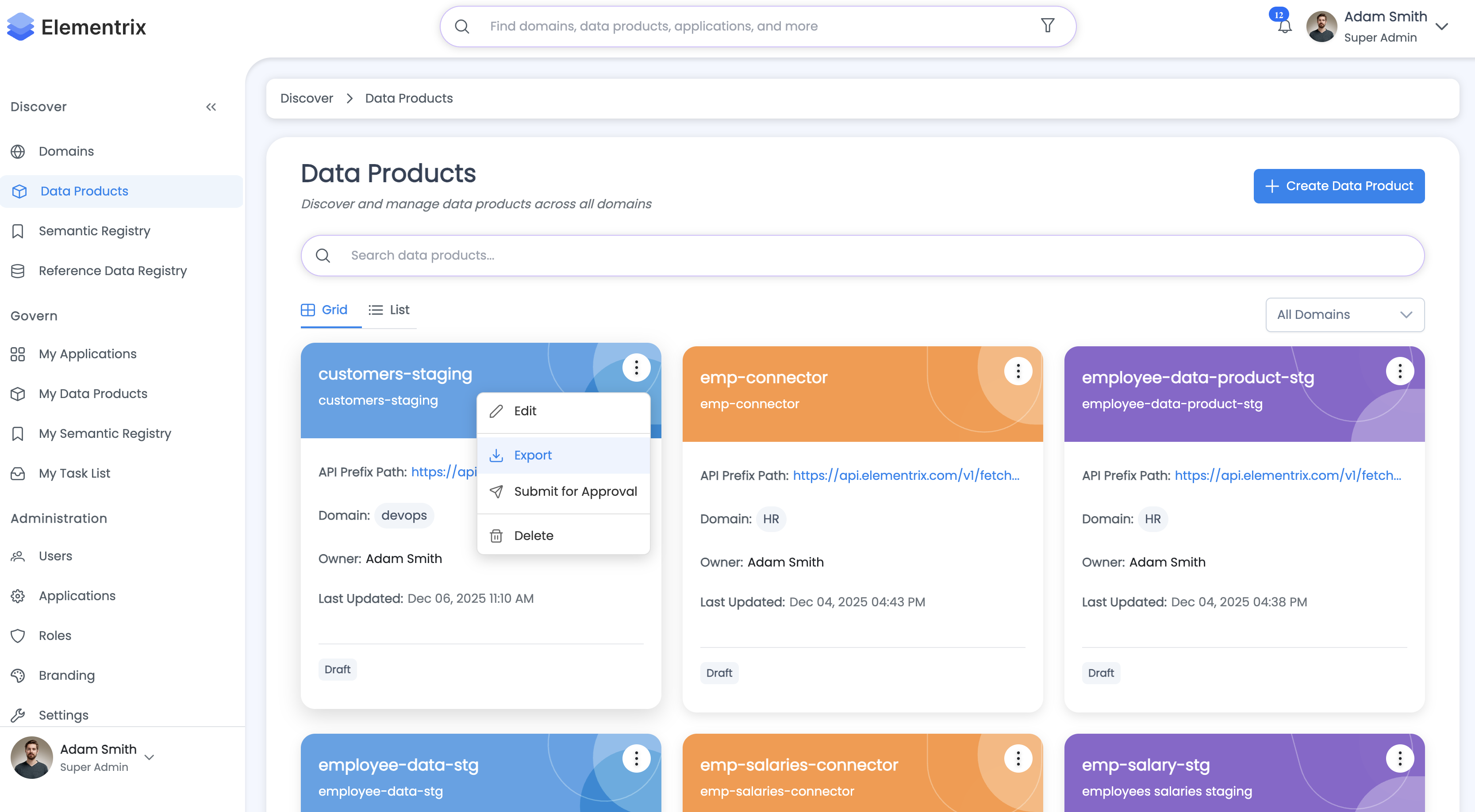
Export a complete data product as a JSON file, including all metadata, schema fields, users, permissions, business glossary terms, and approval workflows.
¶ 2. Import Data Product
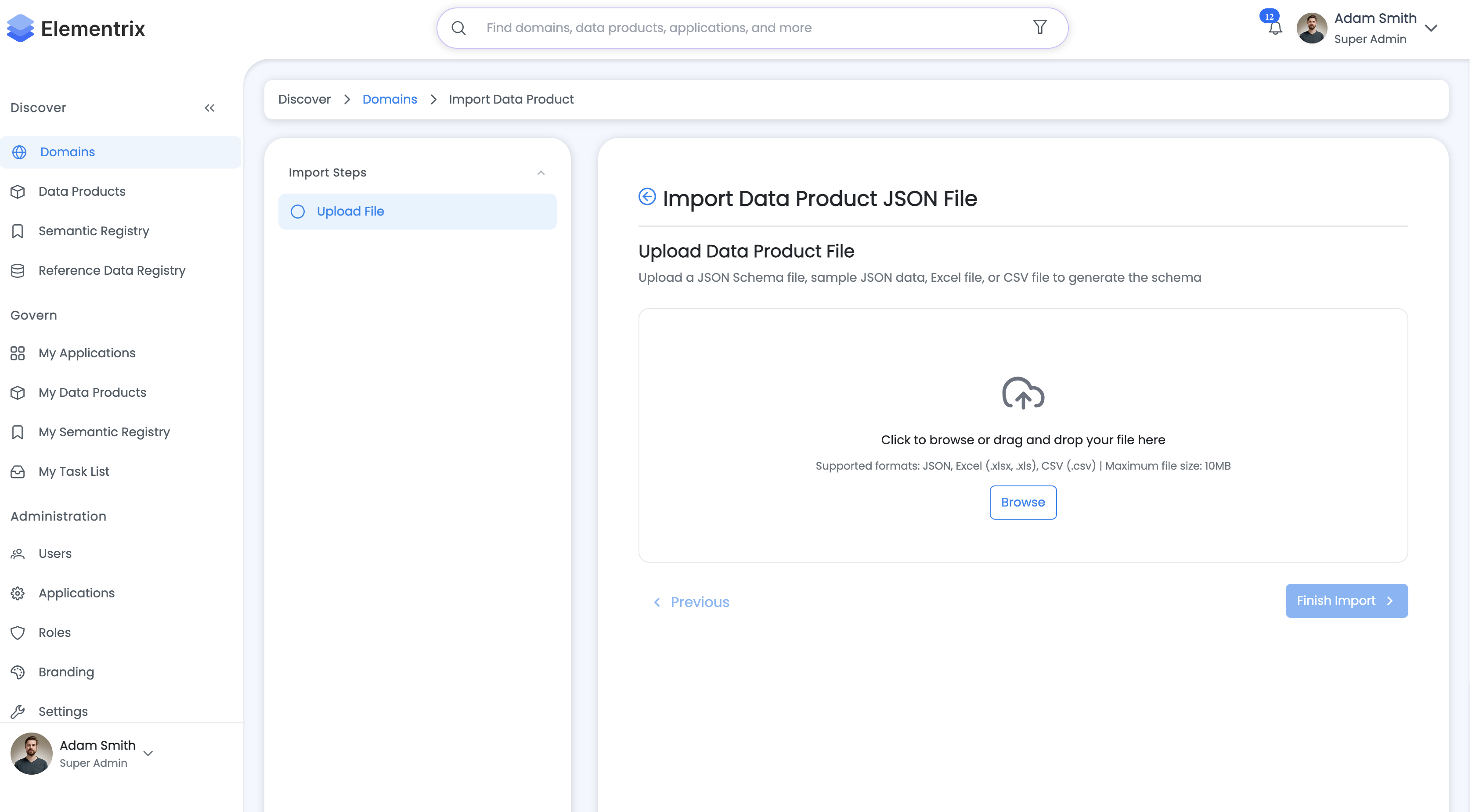
Import entire data product from a JSON file. The system analyzes conflicts, maps users and business terms, and provides a wizard-based import experience.
¶ Supported File Formats
¶ Upload Formats
¶ Export Formats
¶ Export Data Product
¶ Overview
Export a complete data product as a JSON file, including all metadata, schema, permissions, and related configurations. This enables backup, migration, and sharing of data products.
¶ Export Workflow
¶ 1. Access Export Function
Navigate to:
- Data Products > [Your Product] > Actions > Export
- Or use the export button in the product details view
¶ 2. Initiate Export
- Click "Export Data Product"
- System processes the export request
- Download begins automatically
¶ 3. Downloaded File
- File name:
data-products-export-{timestamp}.json - Format: JSON with pretty printing
- Timestamp: ISO instant format (e.g.,
2024-01-15T10:30:45.123Z)
¶ What Gets Exported
The export file contains a comprehensive snapshot:
¶ Data Product Information
- Metadata: Name, description, key, API endpoint, path
- Classification: Security classification level
- Status: Current lifecycle status
- Schema Method: How the schema was created
- Collection: MongoDB collection name (if applicable)
- Agreement: Data product agreement text
- Transformer: Data transformation configuration
¶ Schema and Fields
- Fields Schema: Complete JSON schema definition
- Individual Fields:
- Field ID, name, original name
- Type and constraints
- Required, unique flags
- Min/max length, min/max values
- Default values
- Linked business glossary term IDs
¶ Users and Permissions
- Creator: User ID of product creator
- Owners: List of owner user IDs
- Data Stewards: List of data steward user IDs
- Admins: List of admin user IDs
- Permissions: Detailed permission records for all users
¶ Business Glossary
- Terms: All linked business terms with:
- Term ID, name, definition
- Owner information
- Tags and synonyms
- Category association
- Categories: Business glossary categories with terms
¶ Approval Workflow
- Workflow Configuration: Complete approval workflow
- Steps: Individual approval steps with:
- Step order and type
- Assignee information
- Configuration details
¶ Domain Information
- Domain Metadata: Name, path, API endpoint
- Domain Owner: Owner user details
¶ Data Source
- Connection Details: Database configuration
- Source Type: Type of data source
- Query: Source query or table information
¶ Applications
- Client Applications: Registered applications
- IP Whitelist: Allowed IP addresses
- Status: Application status
¶ System Configuration
- Staging DB Config: Staging database configuration
- Export Timestamp: When the export was created
¶ Export Structure Example
{
  "exportedAt": "2024-01-15T10:30:45.123Z",
  "dataProduct": {
    "id": 789,
    "name": "Customer Data",
    "path": "/api/customers",
    "apiEndpoint": "https://api.example.com/customers",
    "key": "customer-data",
    "description": "Customer information dataset",
    "classification": "CONFIDENTIAL",
    "status": "PUBLISHED",
    "schemaMethod": "UPLOAD",
    "creator": "user-uuid-123",
    "owners": ["owner1@example.com", "owner2@example.com"],
    "dataStewards": ["steward1@example.com"],
    "fields": [
      {
        "id": 1001,
        "name": "customer_id",
        "type": "INTEGER",
        "required": true,
        "unique": true
      },
      {
        "id": 1002,
        "name": "email",
        "type": "STRING",
        "required": true,
        "maxLength": 255,
        "termIds": ["term-uuid-456"]
      }
    ],
    "approvalWorkflow": {
      "name": "Standard Approval",
      "steps": [
        {
          "order": 1,
          "type": "DATA_STEWARD_APPROVAL",
          "assigneeEmail": "steward@example.com"
        }
      ]
    },
    "dataSource": {
      "type": "POSTGRESQL",
      "host": "db.example.com",
      "database": "production",
      "table": "customers"
    }
  },
  "domain": {
    "id": 10,
    "name": "Customer Domain",
    "path": "/customers",
    "ownerEmail": "domain-owner@example.com"
  },
  "users": [
    {
      "id": "user-uuid-123",
      "email": "user@example.com",
      "firstName": "John",
      "lastName": "Doe"
    }
  ],
  "categories": [
    {
      "id": "cat-uuid-789",
      "name": "Customer Information",
      "terms": [
        {
          "id": "term-uuid-456",
          "name": "Email Address",
          "definition": "Customer email contact",
          "ownerEmail": "glossary-owner@example.com",
          "tags": ["PII", "Contact"]
        }
      ]
    }
  ],
  "permissions": [
    {
      "userId": "user-uuid-123",
      "role": "OWNER",
      "dataProductId": 789
    }
  ],
  "stagingDBConfigDto": {
    "host": "staging.example.com",
    "database": "staging_db"
  }
}
¶ Use Cases
- Backup: Regular backups of critical data products
- Migration: Move data products between environments
- Sharing: Share product definitions with other teams
- Versioning: Maintain versions of product configurations
- Disaster Recovery: Restore products after system issues
¶ Import Data Product/Domain
¶ Overview
Import entire domains with multiple data products from a JSON file. The system provides intelligent conflict detection, user mapping, and a wizard-based import experience.
¶ Import Workflow
¶ 1. Access Import Function
Navigate to:
- Domain Management >Specific Domain you want to import data product into > Import
¶ 2. Upload Import File
Supported Formats:
- JSON (exported data products)
Upload Methods:
- Drag-and-drop into the upload zone
- Click to browse and select file
¶ 3. Import Analysis
The system analyzes the file and detects:
Existing Resources:
- Data products with same name
- Domains with same name
- Users already in the system
- Business glossary categories and terms
Conflicts:
- API path conflicts (data product paths)
- Domain path conflicts
- Duplicate names
New Resources:
- Users to be created
- New categories and terms
- New data products
¶ 4. Review Analysis Results
The import wizard displays:
Data Product Information:
- Name, description, classification
- Conflict indicators (if any)
- Proposed actions
Domain Information:
- Domain name and path
- Existing domain detection
- Conflict resolution options
User Mapping:
- Existing users (by email match)
- New users to be created
- User ID mapping for ownership transfer
Business Glossary Mapping:
- Existing categories (by name)
- New categories to create
- Term matching within categories
- Term ID mapping for field links
¶ 5. Resolve Conflicts
For each conflict, choose resolution strategy:
Data Product Conflicts:
- Skip: Don't import this product
- Overwrite: Replace existing product
- Create New: Import with modified name/path
Domain Conflicts:
- Use Existing: Link to existing domain
- Create New: Create new domain with modified path
User Conflicts:
- Map to Existing: Use existing user account
- Create New: Create new user
¶ 6. Configure Preferences
Set import preferences:
- Create missing users automatically
- Link to existing business terms
- Preserve original IDs (if possible)
- Import permissions and roles
¶ 7. Execute Import
- Review final summary
- Click "Import" to proceed
- System creates all resources
- Progress indicator shows import status
¶ 8. Verify Import
After completion:
- Navigate to imported data products
- Verify schema fields and metadata
- Check user permissions
- Confirm business glossary links
¶ Conflict Detection Logic
¶ Data Product Conflicts
1. Check if data product exists by name
   - Query: findByName(dataProductName)

2. Check for API path conflicts
   - Query: existsByPath(apiPath)
   - Even if product doesn't exist, path might be taken
¶ Domain Conflicts
1. Check if domain exists by name
   - Query: isExistDomainName(domainName)

2. Check for domain path conflicts
   - Query: isExistDomainPath(domainPath)
¶ User Matching
1. For each user in import:
   - Search by email: findByEmail(email)
   - If found → existing user
   - If not found → new user

2. Build user mapping:
   - Map<importedUserIdOrEmail, systemUserId>
¶ Business Glossary Matching
1. For each category:
   - Search by name: findByName(categoryName)
   - If found → existing category

2. For each term in category:
   - Search: findByCategory_IdAndName(categoryId, termName)
   - If found → existing term

3. Build term mapping:
   - Map<importedTermId, systemTermId>
¶ ID Replacement During Import
The system intelligently replaces IDs:
User IDs:
- Original creator ID → Mapped to existing user or new user
- Owner IDs → Replaced using user mapping
- Data steward IDs → Replaced using user mapping
- Approval workflow assignee IDs → Replaced
Term IDs:
- Field term references → Replaced using term mapping
- Preserves business glossary links
¶ Best Practices
-
Before Import:
- Review export file structure
- Verify user email addresses exist
- Check for naming conflicts
- Backup current system state
-
During Import:
- Carefully review conflict detection results
- Map users to existing accounts when possible
- Link to existing business terms
- Verify API paths don't conflict
-
After Import:
- Test imported data products
- Verify permissions and ownership
- Check business glossary links
- Update documentation
¶ Use Cases
- Environment Migration: Move products from dev to staging/production
- Backup Restoration: Restore from previous export
- Cross-Organization Sharing: Import products from partner systems
- Disaster Recovery: Rebuild system from backups
- Bulk Creation: Create multiple products from template
¶ Related Documentation
For more information on related features, see:
- Data Products Overview - Introduction to data products
- Data Product Creation Workflow - Step-by-step creation guide
- Data Product Schema - Schema design and management
- Domain Management - Organizing data products in domains
- Semantics Registry - Business glossary and terms
- Roles and Privileges - Permission and access control
- Administration Overview - System administration
Document Version: 1.0
Last Updated: 2024-01-15
Maintained By: Elementrix Documentation Team