¶ Domain Management
Domains are organizational units that group related data products together, providing a logical structure for data discovery and governance.
¶ Overview
What is a Domain?
A data domain represents a specific business area or functional division within your organization. Domains help:
- Organize related data products logically
- Assign ownership and responsibility
- Simplify data discovery for consumers
- Implement domain-driven governance
Examples of Domains:
- Finance
- Marketing
- Sales
- Customer Service
- Human Resources
- Supply Chain
- Product Management
¶ Domain Properties
Each domain has the following attributes:
Domain Configuration:

Basic Information:
  Name: Finance
  Description: Financial data products including transactions,
               reports, and analytics
  Path: /finance
  Status: Active

Ownership:
  Owner: john.doe@company.com
    Name: John Doe
    Role: Finance Data Owner

Statistics:
  Data Products: 15
  Endpoints: 45
  Last Modified: 2025-01-25 14:30 UTC
¶ Domain Status
Domains can have four status values:
- Active: Domain is in production use
- Inactive: Domain is temporarily disabled
- Beta: Domain is in testing phase
- Development: Domain is under development
¶ Accessing Domain Management
Navigation:
- Main Menu → Discover → Domains
- Or directly:
/domains
Permissions Required:
- View Domains: All authenticated users
- Create Domain: Users with CREATE_DOMAIN permission
- Edit Domain: Domain owners or admins
- Delete Domain: Domain owners or admins
¶ Viewing Domains
¶ Grid View
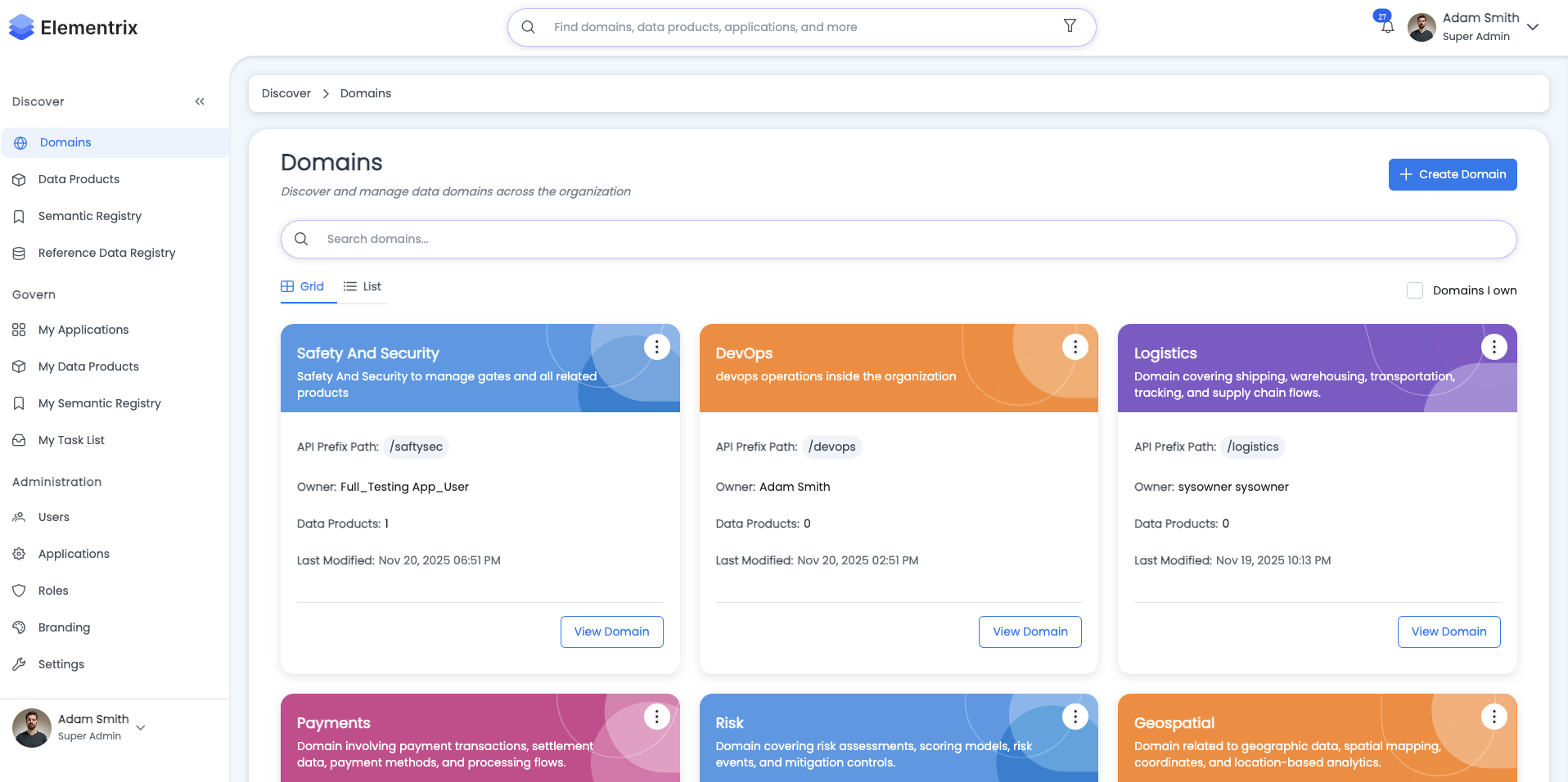
Visual card-based display of all domains:
┌─────────────────────┐  ┌─────────────────────┐  ┌─────────────────────┐
│  Finance           │  │  Marketing         │  │  Sales             │
│                    │  │                    │  │                    │
│  Owner: John Doe   │  │  Owner: Jane Smith │  │  Owner: Bob Johnson│
│  Products: 15      │  │  Products: 12      │  │  Products: 8       │
│  Endpoints: 45     │  │  Endpoints: 36     │  │  Endpoints: 24     │
│  Status: Active    │  │  Status: Active    │  │  Status: Beta      │
└─────────────────────┘  └─────────────────────┘  └─────────────────────┘

┌─────────────────────┐  ┌─────────────────────┐  ┌─────────────────────┐
│  Customer Service  │  │  HR                │  │  Supply Chain      │
│                    │  │                    │  │                    │
│  Owner: Alice W.   │  │  Owner: David Lee  │  │  Owner: Sarah Chen │
│  Products: 10      │  │  Products: 5       │  │  Products: 18      │
│  Endpoints: 30     │  │  Endpoints: 15     │  │  Endpoints: 54     │
│  Status: Active    │  │  Status: Active    │  │  Status: Active    │
└─────────────────────┘  └─────────────────────┘  └─────────────────────┘

[Toggle to List View] [Create Domain] [Search: ___________]
Grid View Features:
- Color-coded domain cards with gradient backgrounds
- Quick view of key statistics
- Visual status indicators
- Hover to view data product names
- Click card to view domain details
¶ List View
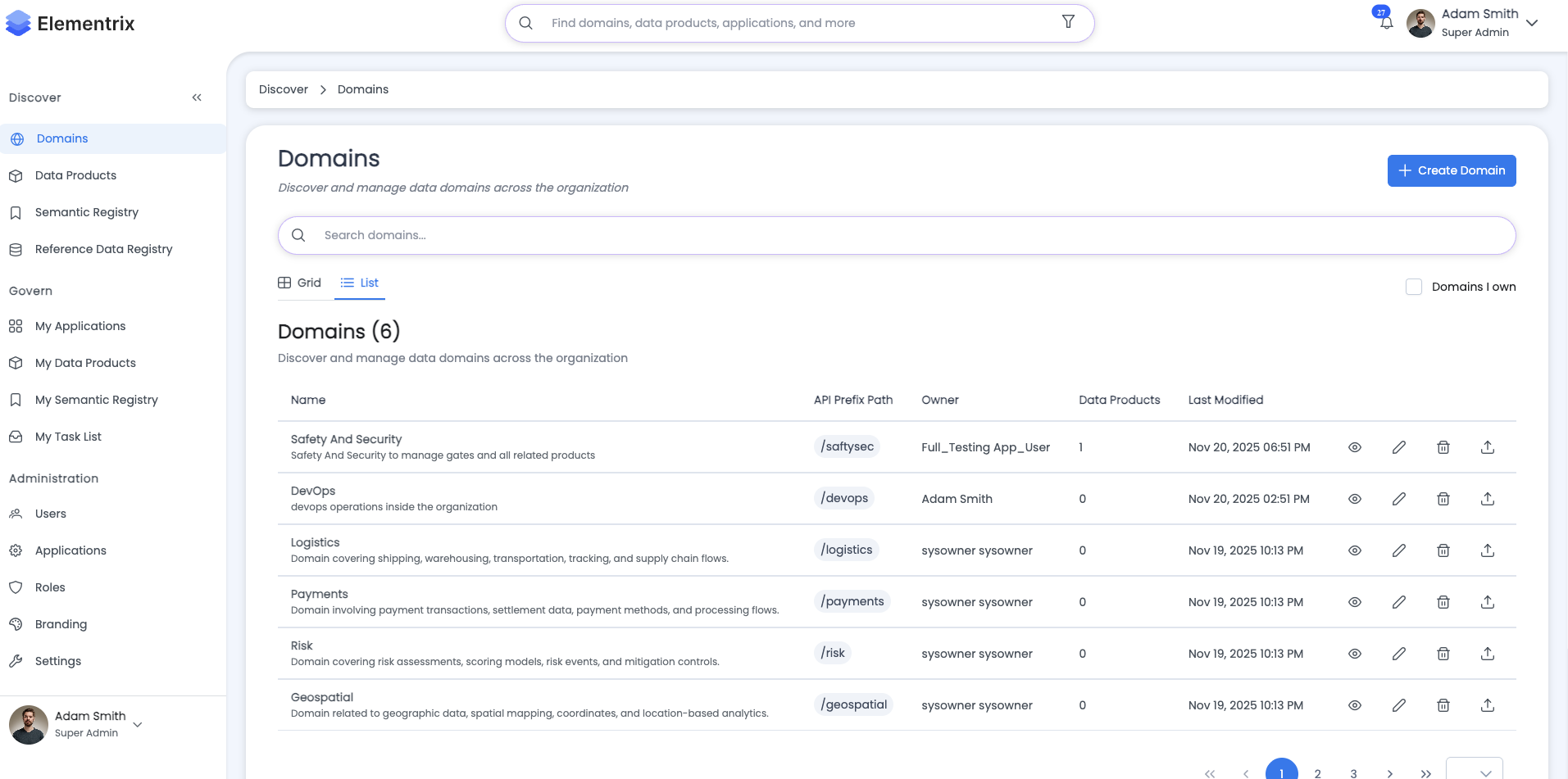
Table-based display with detailed information:
Domain List:

┌────────────────────────────────────────────────────────────────────────┐
│ Name          │ Description      │ Owner       │ Products │ Status    │
├────────────────────────────────────────────────────────────────────────┤
│ Finance       │ Financial data   │ John Doe    │ 15       │ ✓ Active  │
│ Marketing     │ Marketing data   │ Jane Smith  │ 12       │ ✓ Active  │
│ Sales         │ Sales data       │ Bob Johnson │ 8        │ ⚠ Beta    │
│ Customer Svc  │ Customer data    │ Alice W.    │ 10       │ ✓ Active  │
│ HR            │ HR data          │ David Lee   │ 5        │ ✓ Active  │
│ Supply Chain  │ Supply data      │ Sarah Chen  │ 18       │ ✓ Active  │
└────────────────────────────────────────────────────────────────────────┘

Rows per page: [10 ▼]  Showing 1-6 of 6  [< 1 >]

[Toggle to Grid View] [Create Domain] [Search: ___________]
List View Features:
- Sortable columns
- Pagination controls
- Quick actions menu (Edit, Delete)
- Inline status display
- Compact information density
¶ Filtering and Search
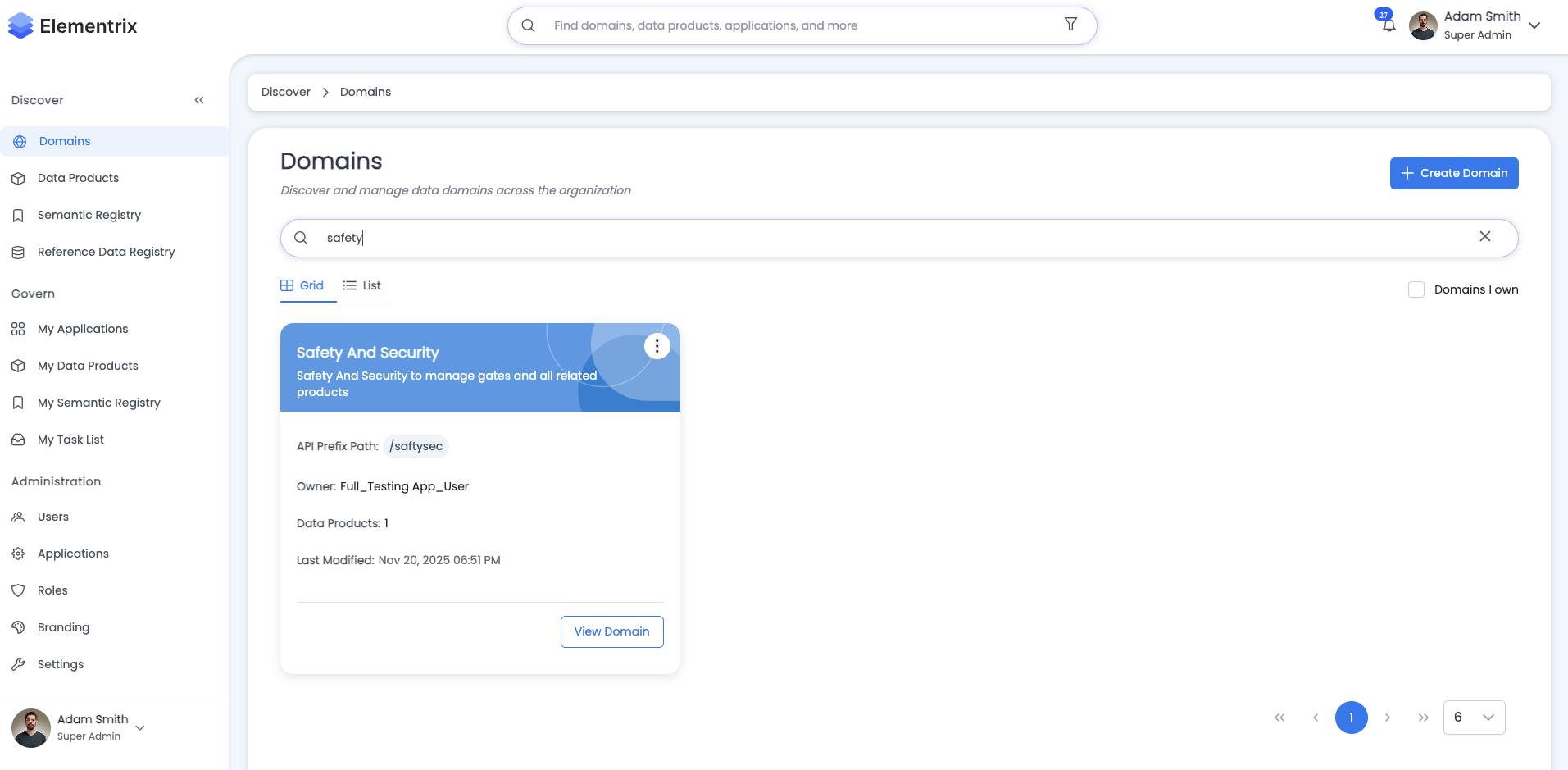
Filter Options:
Filters:
☑ Domains I Own

Search: [_____________________]  [🔍 Search]

Results: 15 domains
Search Functionality:
- Real-time search as you type
- Searches domain names and descriptions
- Case-insensitive matching
- Highlights matching results
¶ Creating a Domain
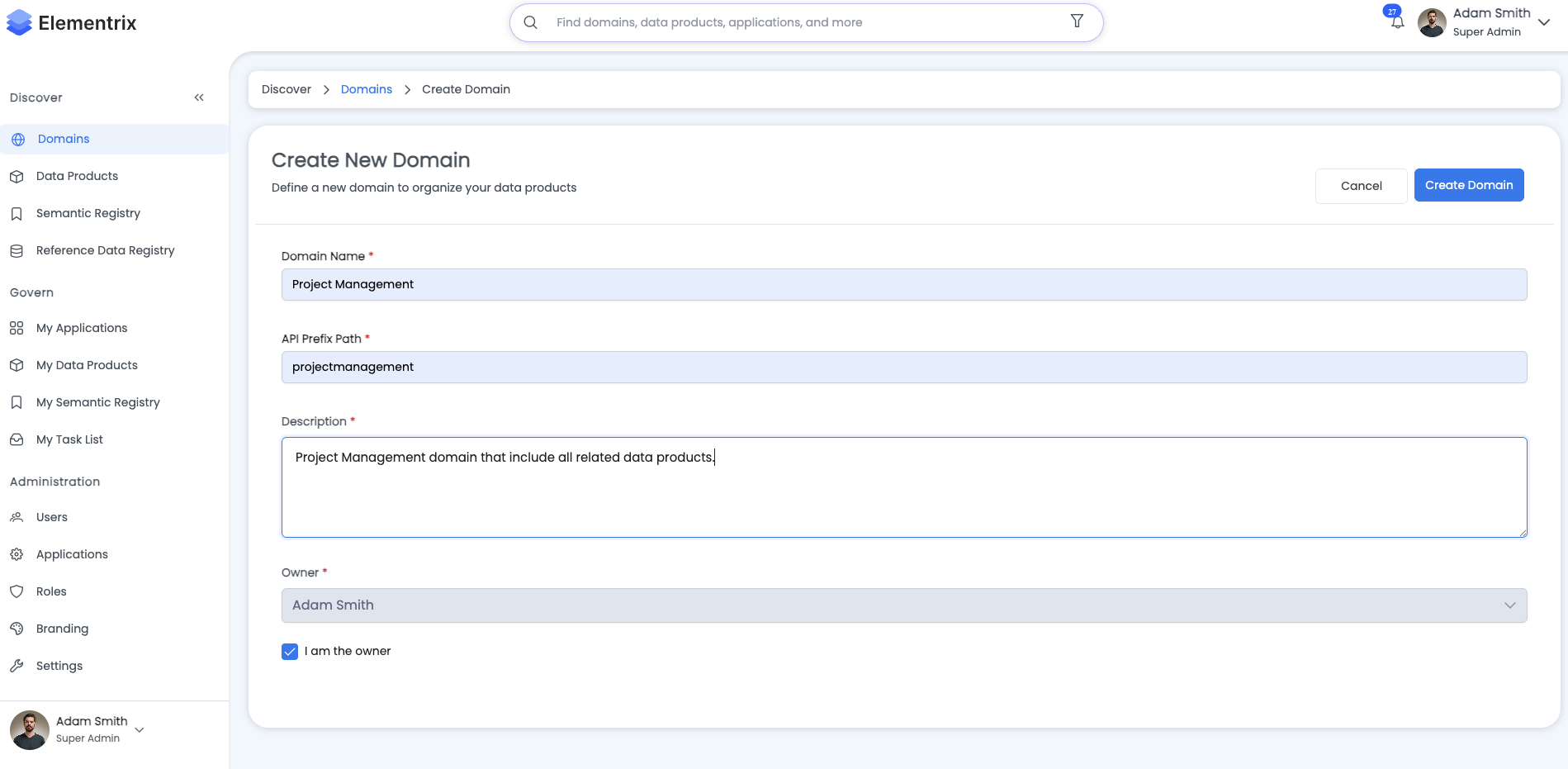
Step-by-Step Process:
¶ Step 1: Navigate to Create Domain
Click "Create Domain" button from domains list page.
¶ Step 2: Fill Domain Information
Create Domain:

Basic Information:
  Name: [Finance]

  Description: [Financial data products including transactions,
                reports, budgets, and financial analytics]

  Path: [/finance] (auto-generated from name)

  Status: [Active ▼]
    Options:
    - Active
    - Inactive
    - Beta
    - Development

Owner:
  Owner: [john.doe@company.com]  [🔍 Search Users]
    Selected: John Doe (john.doe@company.com)

[Cancel] [Save Domain]
¶ Step 3: Save Domain
Click "Save Domain" to create the domain.
Validation Rules:
- Name: Required, unique, max 100 characters
- Description: Required, max 500 characters
- Path: Auto-generated from name, lowercase, hyphens for spaces
- Owner: Required, must be a valid user
- Status: Required, default is "Active"
Success Message:
✓ Domain "Finance" created successfully!

Next Steps:
1. Add data products to your domain
2. Configure domain-specific settings
3. Share domain with team members

[View Domain] [Create Another Domain] [Go to Domains List]
¶ Editing a Domain
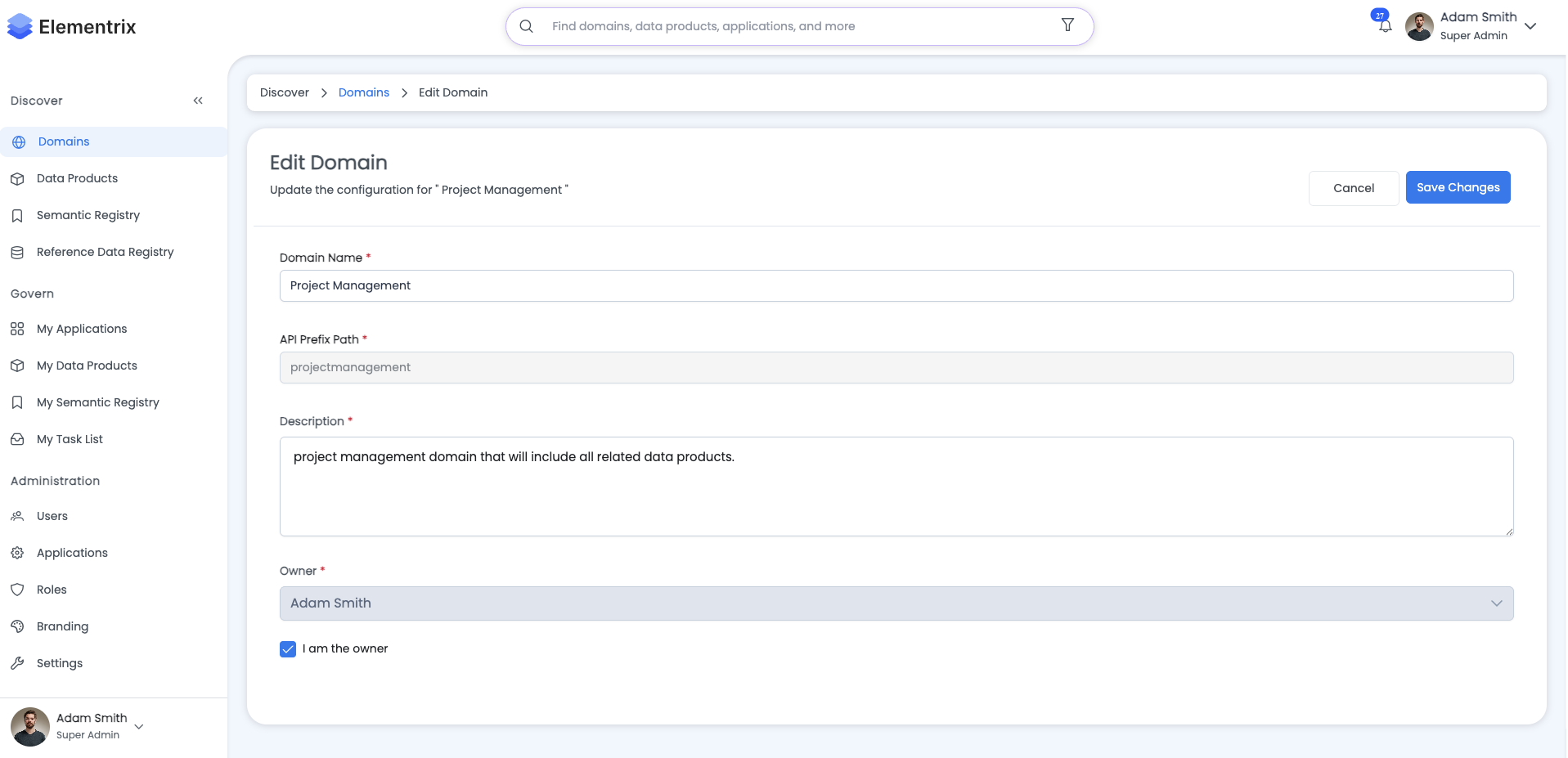
Permissions: Domain owner or administrator
Process:
- Navigate to domain (Grid or List view)
- Click "Edit" button or menu option
- Modify domain properties
- Click "Save Changes"
Edit Domain: Finance

Basic Information:
  Name: [Finance]

  Description: [Financial data products including transactions,
                reports, budgets, and financial analytics.
                Updated to include forecasting data.]

  Path: [/finance] (read-only)

  Status: [Active ▼]

Owner:
  Current Owner: John Doe (john.doe@company.com)
  Change Owner: [jane.smith@company.com]  [🔍 Search Users]

[Cancel] [Save Changes]
Editable Fields:
- ✓ Name (updates path automatically)
- ✓ Description
- ✓ Status
- ✓ Owner (transfer ownership)
Non-Editable Fields:
- ✗ Path (auto-managed)
- ✗ Product Count (system-managed)
- ✗ Endpoint Count (system-managed)
- ✗ Created Date (system-managed)
¶ Viewing Domain Details
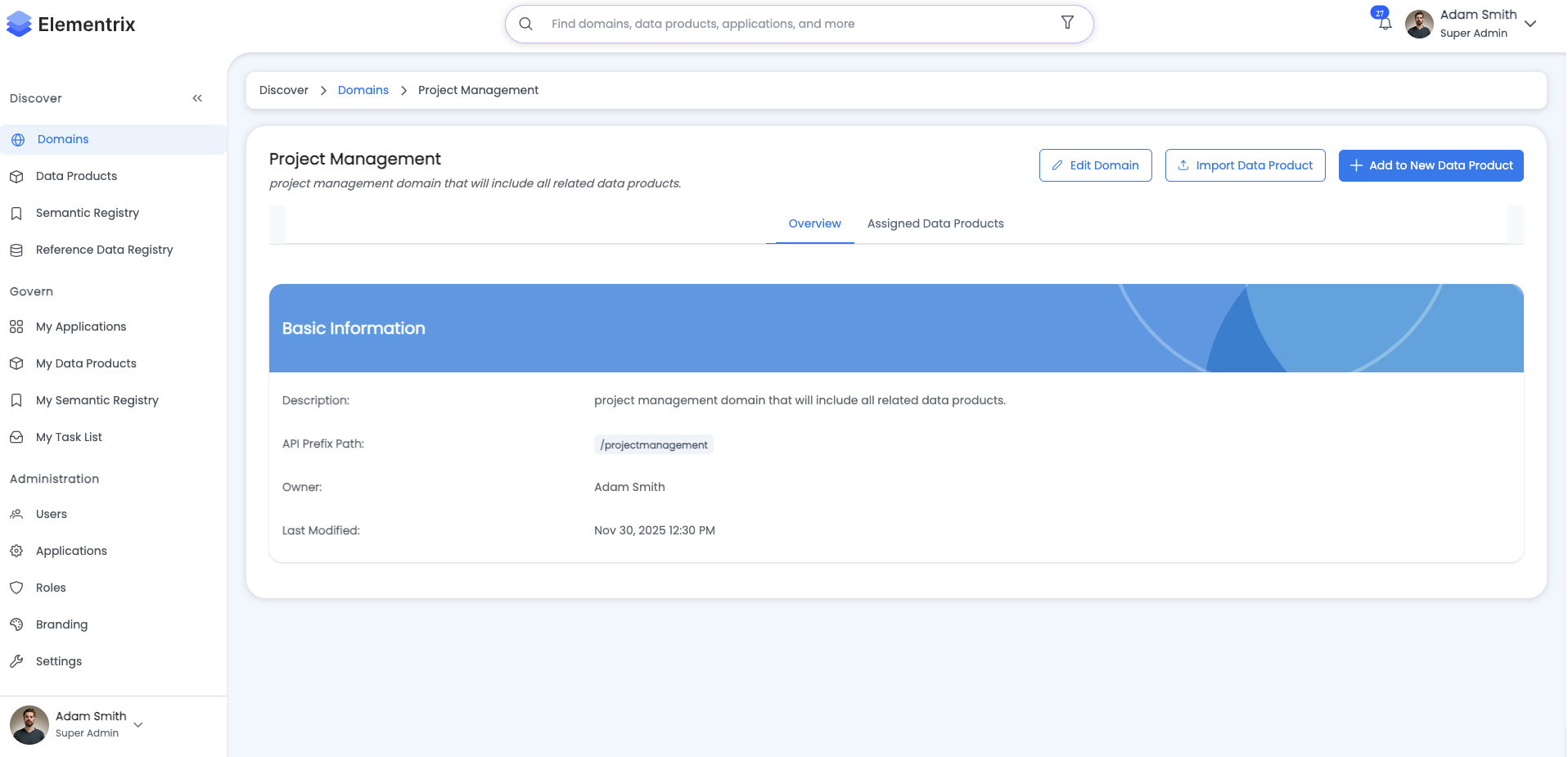
Click on any domain card or name to view detailed information:
Domain Details: Finance

Overview | Products | Activity

─────────────────────────────────────────────────────────────
Overview Tab:
─────────────────────────────────────────────────────────────

Basic Information:
  Name: Finance
  Description: Financial data products including transactions,
               reports, budgets, and financial analytics
  Path: /finance
  Status: ✓ Active
  Created: 2024-06-15
  Last Modified: 2025-01-25 14:30 UTC

Ownership:
  Owner: John Doe
  Email: john.doe@company.com
  Joined: 2024-01-10

Statistics:
  Total Data Products: 15
  Total Endpoints: 45
  Active Products: 12
  Draft Products: 2
  In Review Products: 1

Recent Updates:
  - 2025-01-25: Product "Q4 Financial Reports" published
  - 2025-01-20: Product "Transaction History" updated
  - 2025-01-15: Product "Budget Forecasts" created

[Edit Domain] [Delete Domain] [Import Data Product]
¶ Products Tab
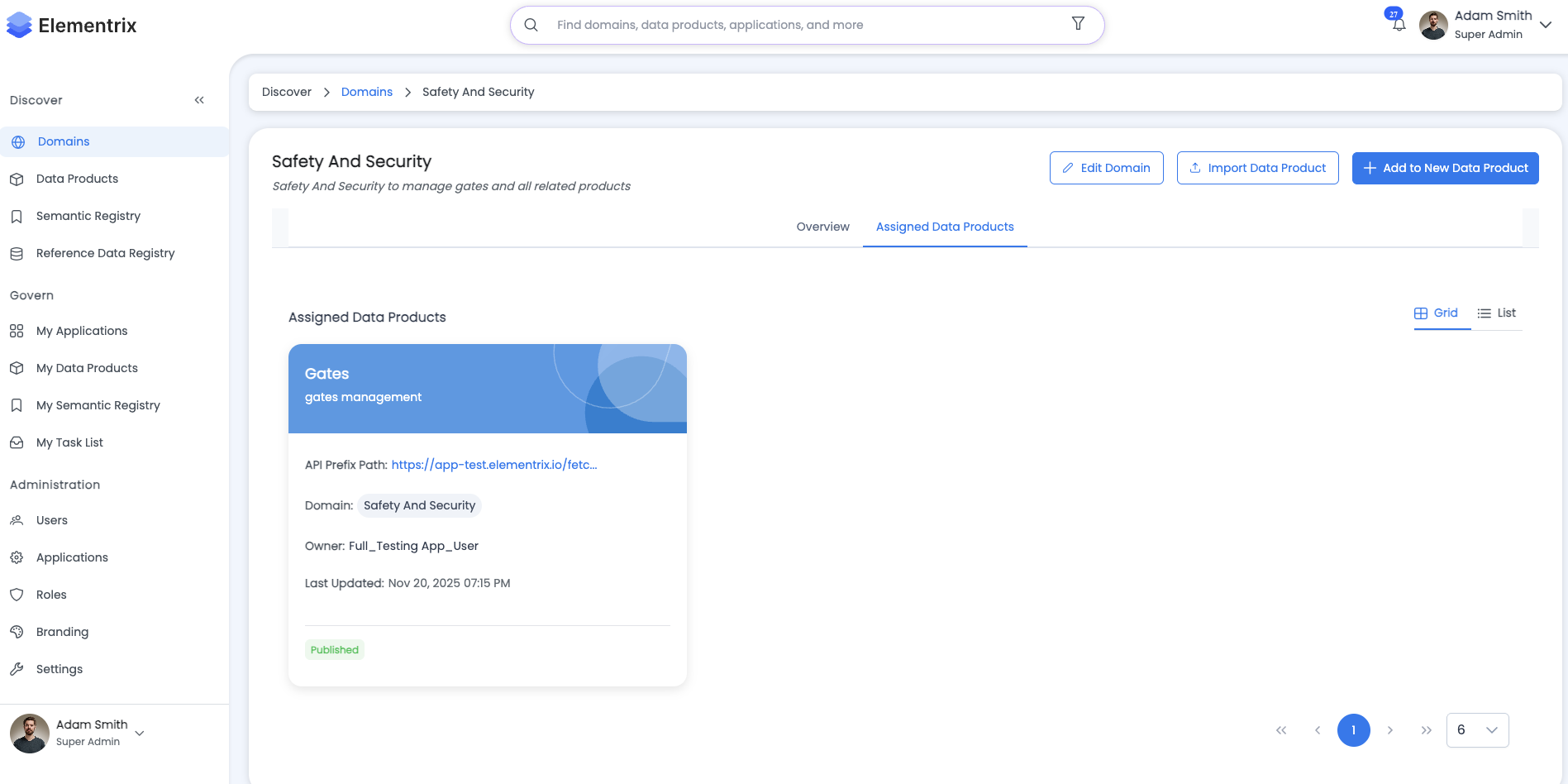
Lists all data products in this domain:
─────────────────────────────────────────────────────────────
Products Tab:
─────────────────────────────────────────────────────────────

Data Products in Finance Domain:

┌─────────────────────────────────────────────────────────────┐
│ Product Name         │ Status      │ Owner        │ Updated │
├─────────────────────────────────────────────────────────────┤
│ Transaction History  │ Published   │ John Doe     │ Jan 20  │
│ Q4 Financial Reports │ Published   │ Jane Smith   │ Jan 25  │
│ Budget Forecasts     │ Published   │ John Doe     │ Jan 15  │
│ Revenue Analytics    │ Published   │ Bob Johnson  │ Jan 10  │
│ Expense Tracking     │ In Review   │ Alice W.     │ Jan 18  │
│ Cash Flow Analysis   │ Draft       │ John Doe     │ Jan 22  │
│ ... (9 more)                                                │
└─────────────────────────────────────────────────────────────┘

[View Product] [Create New Product in this Domain]
¶ Importing Data Products
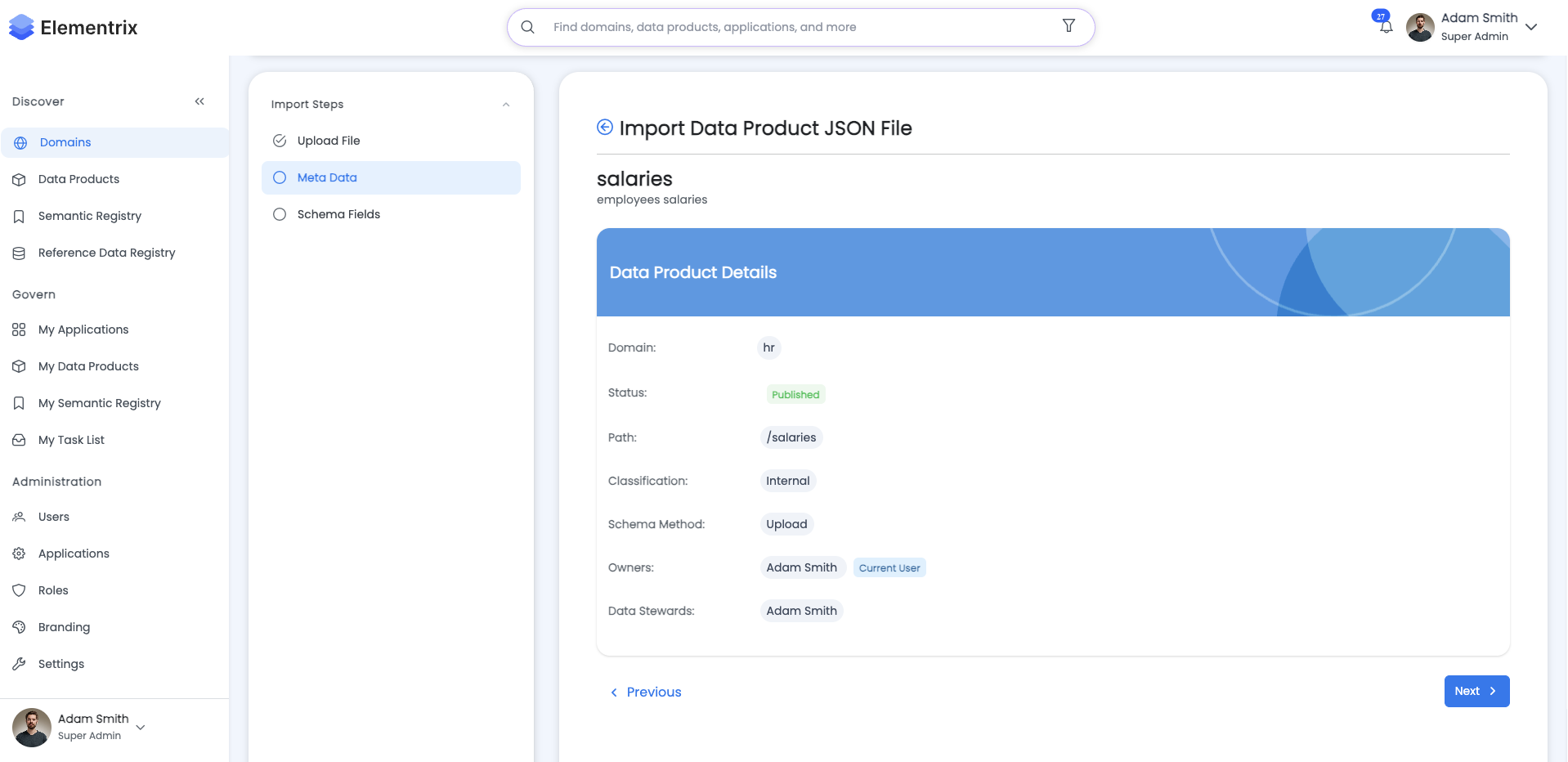
Domains support importing existing data products from external sources:
Process:
- Navigate to domain details
- Click "Import Data Product"
- Launch import wizard
Import Data Product Wizard:

Step 1: Select Source
─────────────────────
Source Type: [Database Connector ▼]
  Options:
  - Database Connector
  - JSON/CSV Upload
  - API Integration
  - Manual Entry

[Cancel] [Next]

──────────────────────────────────────────────

Step 2: Configure Connection
─────────────────────────────
Database Type: [PostgreSQL ▼]

Connection Details:
  Host: [db.company.com]
  Port: [5432]
  Database: [finance_db]
  Username: [readonly_user]
  Password: [••••••••]

[Test Connection] [Back] [Next]

──────────────────────────────────────────────

Step 3: Select Tables
──────────────────────
Available Tables:
☑ transactions
☑ budgets
☐ forecasts
☐ revenue_streams

[Select All] [Back] [Next]

──────────────────────────────────────────────

Step 4: Configure Product
──────────────────────────
Product Name: [Transaction History]
Description: [Complete transaction records]
Update Frequency: [Daily ▼]

[Back] [Import]
Import Result:
✓ Import Successful!

Imported Data Products:
- Transaction History (transactions table)
- Budget Data (budgets table)

Status: Ready for configuration
Next Steps:
1. Configure product schemas
2. Add semantic mappings
3. Set up access workflows
4. Submit for governance review

[Configure Products] [Import More] [Done]
¶ Deleting a Domain
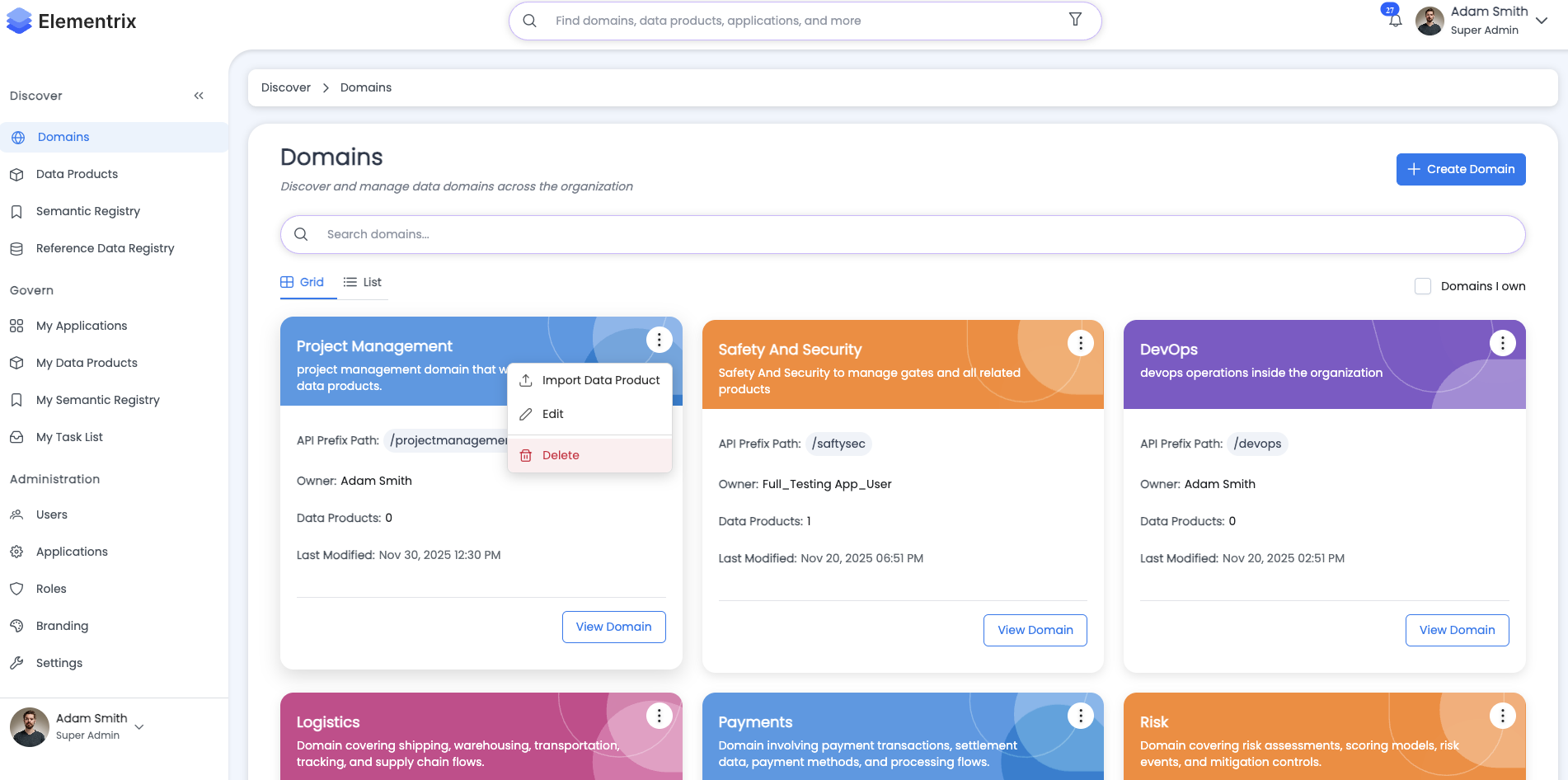
Permissions: Domain owner or administrator
Important Considerations:
- Cannot delete domains with active data products
- Must transfer or delete all products first
- Deletion is permanent and cannot be undone
Process:
Delete Domain: Finance

⚠️ Warning: This action cannot be undone!

Before deleting this domain:
✗ Domain contains 15 data products

  You must either:
  1. Transfer all products to another domain
  2. Delete all products individually

Current Domain Information:
  Name: Finance
  Owner: John Doe
  Products: 15
  Endpoints: 45

[Cancel] [Delete Domain] (disabled)
When Domain is Empty:
Delete Domain: Marketing

⚠️ Warning: This action cannot be undone!

Confirm Deletion:
  Domain Name: Marketing
  Owner: Jane Smith
  Products: 0 ✓

Type "DELETE" to confirm: [______]

[Cancel] [Delete Domain]
¶ Domain Management Best Practices
¶ Naming Conventions
Good Domain Names:
- Finance
- Customer Service
- Supply Chain Management
- Product Analytics
- Human Resources
Avoid:
- Generic names (Data, Information, General)
- Overly long names (more than 3-4 words)
- Technical jargon
- Acronyms without context
¶ Organization Structure
Align with Business Structure:
Organization:
├── Finance
│   ├── Accounting
│   ├── Budgeting
│   └── Financial Reporting
├── Marketing
│   ├── Campaign Analytics
│   ├── Customer Insights
│   └── Market Research
├── Sales
│   ├── CRM Data
│   ├── Sales Performance
│   └── Revenue Analytics
└── Operations
    ├── Supply Chain
    ├── Logistics
    └── Inventory Management
¶ Ownership Guidelines
Domain Owner Responsibilities:
- Maintain domain description and metadata
- Review and approve data products in domain
- Ensure data quality and governance compliance
- Monitor domain activity and usage
- Coordinate with domain contributors
Choosing a Domain Owner:
- Should be a business stakeholder (not IT)
- Responsible for the business domain
- Has decision-making authority
- Available for approvals and reviews
- Knowledgeable about domain data
¶ Lifecycle Management
Domain Lifecycle:
Development → Beta → Active → Inactive → (Deleted)
- Development: Domain setup, initial products
- Beta: Testing phase, limited access
- Active: Production use, full access
- Inactive: Temporarily disabled, planning deprecation
- Deleted: Removed from system (no products)
¶ Common Workflows
¶ Workflow 1: Create New Business Domain
Scenario: New business unit requires data organization
Steps:
- Create domain with appropriate name and description
- Assign business stakeholder as owner
- Set status to "Development"
- Import or create initial data products
- Configure domain-specific governance rules
- Test with pilot users
- Change status to "Active"
- Announce to organization
¶ Workflow 2: Transfer Domain Ownership
Scenario: Domain owner leaves organization
Steps:
- Navigate to domain details
- Click "Edit Domain"
- Search for new owner
- Select new owner from results
- Save changes
- Notify new owner via email
- Document ownership transfer in activity log
¶ Workflow 3: Consolidate Domains
Scenario: Merge two overlapping domains
Steps:
- Review data products in both domains
- Choose primary domain to keep
- Transfer products from secondary domain
- Update product references and documentation
- Set secondary domain status to "Inactive"
- After transition period, delete secondary domain
¶ Troubleshooting
¶ Cannot Delete Domain
Problem: "Delete Domain" button is disabled
Solution:
- Verify domain has 0 data products
- Transfer or delete all products
- Check that you have delete permission
- Contact administrator if issue persists
¶ Cannot Find Domain
Problem: Domain not appearing in list
Solution:
- Clear search filters
- Uncheck "Domains I Own" filter
- Verify domain status (may be Inactive)
- Check your permissions
- Contact domain owner for access
¶ Import Wizard Fails
Problem: Import wizard shows error
Solution:
- Verify connection details are correct
- Test database connectivity separately
- Check firewall and network access
- Verify credentials have read permissions
- Review error message for specific issue
- Contact IT support if connection issues persist
¶ Next Steps
- Learn about Data Product Creation
- Review Data Product Lifecycle
- Understand Roles and Privileges
- Explore Discovery and Access