¶ Staging Database Management
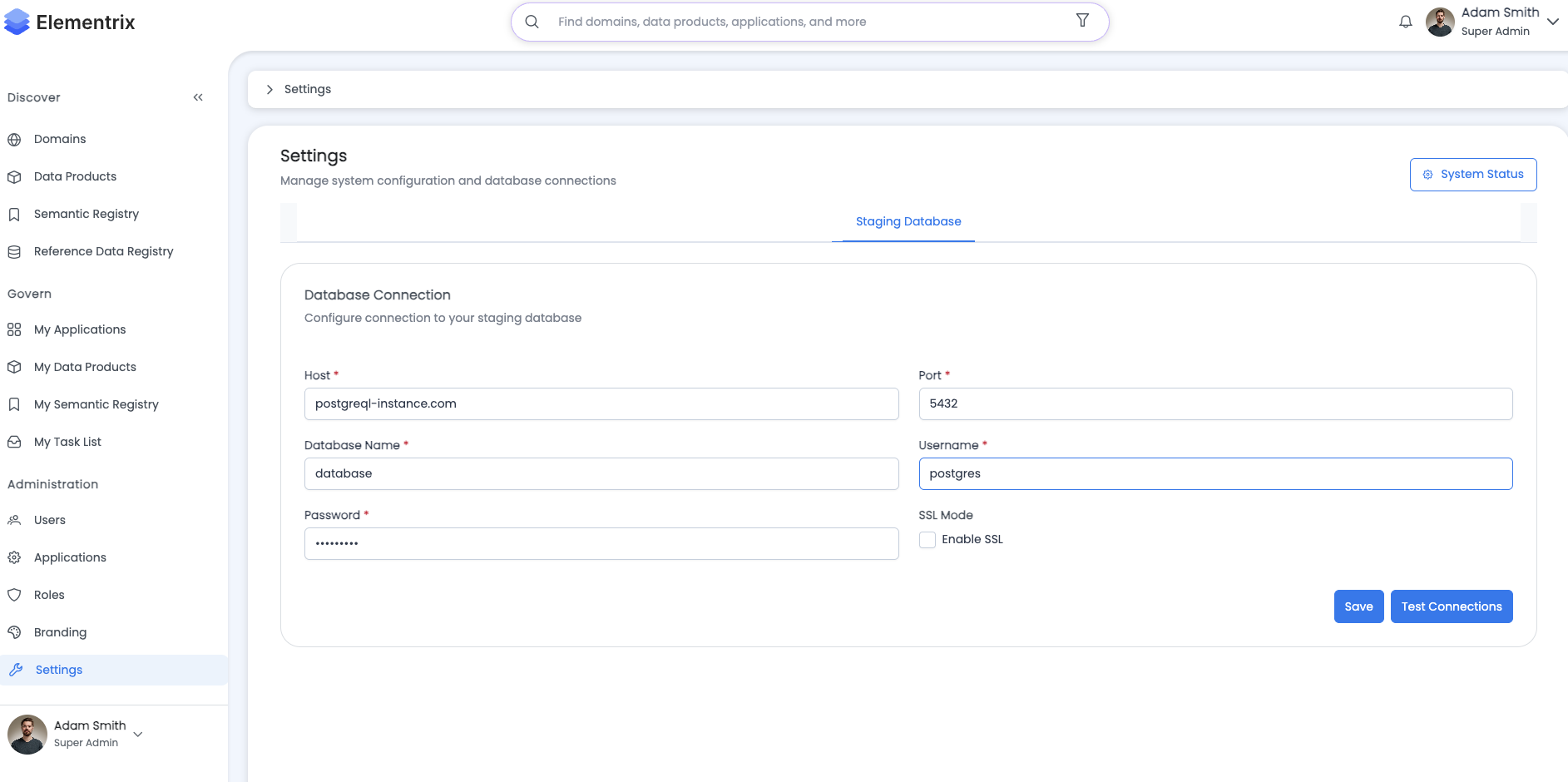
Administrators configure and manage the PostgreSQL staging database that allows users to load data from unsupported sources and create data products from them.
¶ Overview
The staging database is a managed PostgreSQL database provided by Elementrix that enables users to:
- Load data from sources not directly supported (Oracle, MongoDB, APIs, file systems)
- Transform and prepare data before creating data products
- Create data products using the standard database connector workflow
¶ Admin Capabilities
¶ 1. Database Configuration
Configure Staging Database Credentials:
Administrators set up the PostgreSQL staging database connection that will be available to all users in the organization.
Staging Database Configuration:

Purpose: Provide a PostgreSQL database for users to load data from unsupported sources

Database Connection Details:
  Host: [staging-db.elementrix.io]
  Port: [5432]
  Database Name: [staging_org_12345]
  Username: [org_12345_admin]
  Password: [••••••••••••••••]
  SSL Mode: ☑ Require

Connection String (read-only):
postgresql://org_12345_admin:••••••••@staging-db.elementrix.io:5432/staging_org_12345?sslmode=require

Connection Pool Settings:
  Maximum Connections: [50]
  Minimum Idle Connections: [5]
  Connection Timeout: [30] seconds

[Test Connection] [Save Configuration] [Reset Credentials]
Test Connection Result:
Connection Test Results:

✓ Host reachable
✓ Port accessible
✓ Database exists
✓ Credentials valid
✓ SSL connection established
✓ PostgreSQL version: 15.2

Connection successful!

[Close]
¶ 2. View Staging Tables
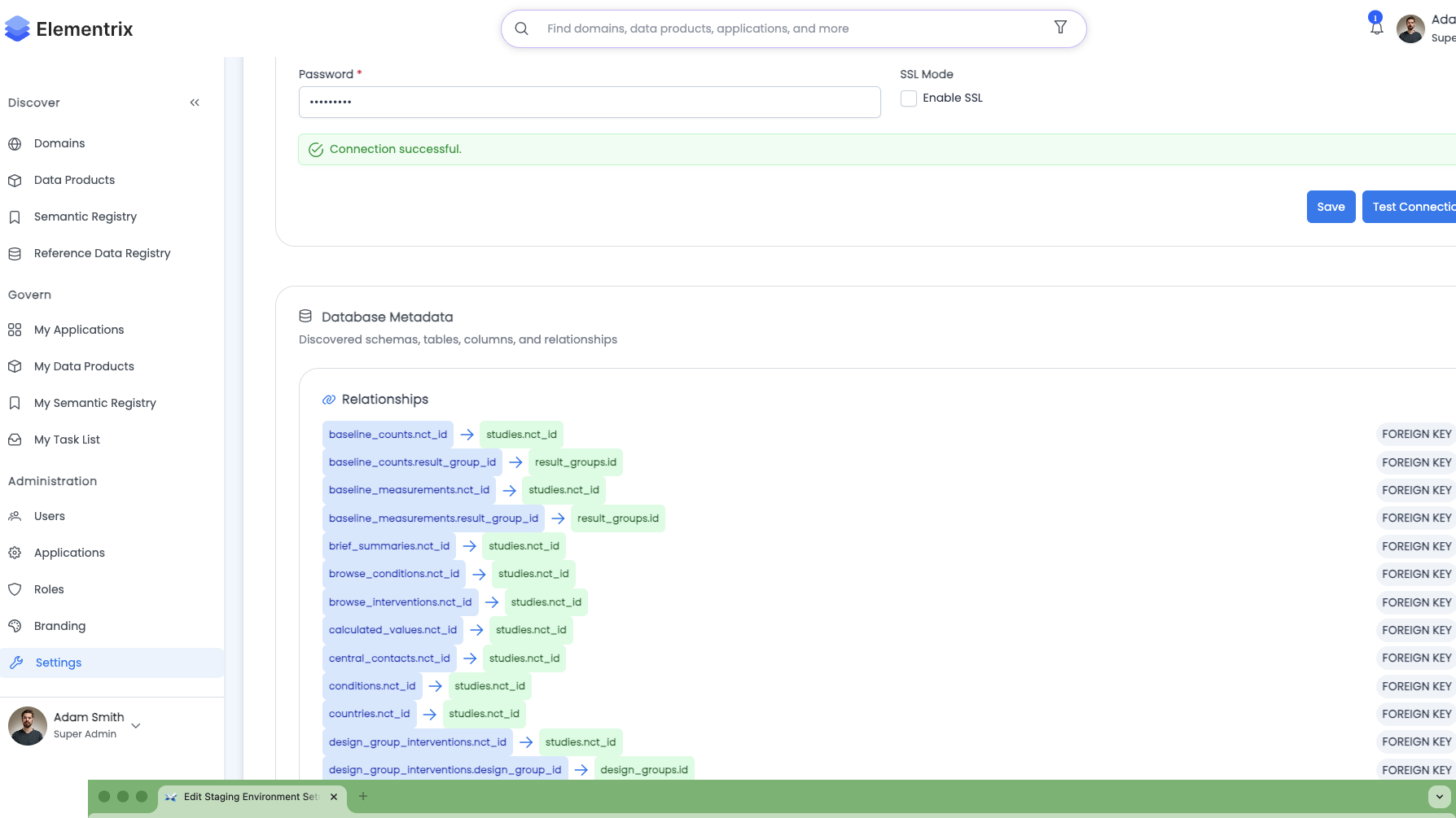
Current Tables in Staging Database:
Administrators can view all tables currently in the staging database created by users.
Staging Database Tables:

Total Tables: 12
Total Size: 4.2 GB
Last Updated: 2025-01-25 14:30 UTC

┌────────────────────────────────────────────────────────────────┐
│ Table Name: customer_data                                      │
│ Owner: john.doe@company.com                                    │
│ Created: 2025-01-20 10:15 UTC                                  │
│ Rows: ~1,245,678                                               │
│ Size: 845 MB                                                   │
│ Columns: 15                                                    │
│ Last Modified: 2025-01-24 16:30 UTC                            │
│ [View Schema] [View Sample Data] [Delete Table]                │
├────────────────────────────────────────────────────────────────┤
│ Table Name: api_transactions                                   │
│ Owner: jane.smith@company.com                                  │
│ Created: 2025-01-18 09:00 UTC                                  │
│ Rows: ~567,890                                                 │
│ Size: 234 MB                                                   │
│ Columns: 8                                                     │
│ Last Modified: 2025-01-25 02:00 UTC                            │
│ [View Schema] [View Sample Data] [Delete Table]                │
├────────────────────────────────────────────────────────────────┤
│ Table Name: mongo_orders                                       │
│ Owner: bob.johnson@company.com                                 │
│ Created: 2025-01-15 14:45 UTC                                  │
│ Rows: ~2,345,123                                               │
│ Size: 1.2 GB                                                   │
│ Columns: 22                                                    │
│ Last Modified: 2025-01-25 08:00 UTC                            │
│ [View Schema] [View Sample Data] [Delete Table]                │
├────────────────────────────────────────────────────────────────┤
│ Table Name: oracle_sales                                       │
│ Owner: alice.williams@company.com                              │
│ Created: 2025-01-22 11:20 UTC                                  │
│ Rows: ~890,234                                                 │
│ Size: 456 MB                                                   │
│ Columns: 18                                                    │
│ Last Modified: 2025-01-25 12:00 UTC                            │
│ [View Schema] [View Sample Data] [Delete Table]                │
└────────────────────────────────────────────────────────────────┘

Sort By: [Last Modified ▼] [Name] [Size] [Rows] [Owner]
Filter By Owner: [All Users ▼]

[Refresh] [Export Table List] [Database Statistics]
View Table Schema:
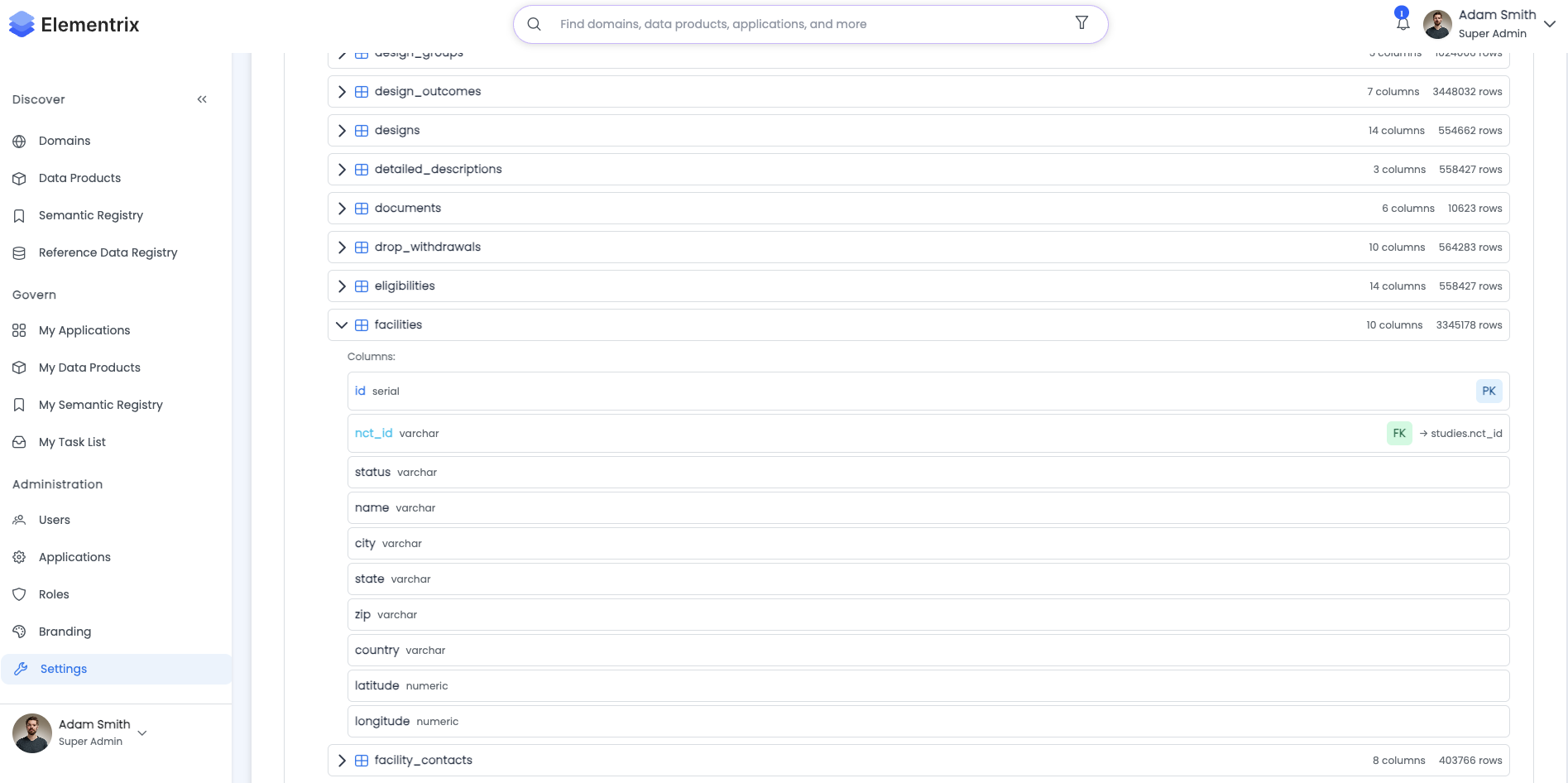
Table Schema: customer_data

Owner: john.doe@company.com
Created: 2025-01-20 10:15 UTC
Rows: ~1,245,678
Size: 845 MB

Columns:
┌──────────────────┬─────────────────┬──────────┬─────────────┐
│ Column Name      │ Data Type       │ Nullable │ Default     │
├──────────────────┼─────────────────┼──────────┼─────────────┤
│ customer_id      │ UUID            │ NOT NULL │ -           │
│ name             │ VARCHAR(200)    │ NOT NULL │ -           │
│ email            │ VARCHAR(200)    │ YES      │ NULL        │
│ phone            │ VARCHAR(50)     │ YES      │ NULL        │
│ address          │ TEXT            │ YES      │ NULL        │
│ city             │ VARCHAR(100)    │ YES      │ NULL        │
│ state            │ VARCHAR(50)     │ YES      │ NULL        │
│ zip_code         │ VARCHAR(20)     │ YES      │ NULL        │
│ country          │ VARCHAR(50)     │ YES      │ NULL        │
│ signup_date      │ TIMESTAMP       │ YES      │ NULL        │
│ last_login       │ TIMESTAMP       │ YES      │ NULL        │
│ account_status   │ VARCHAR(20)     │ YES      │ 'active'    │
│ total_purchases  │ INTEGER         │ YES      │ 0           │
│ created_at       │ TIMESTAMP       │ NOT NULL │ NOW()       │
│ updated_at       │ TIMESTAMP       │ NOT NULL │ NOW()       │
└──────────────────┴─────────────────┴──────────┴─────────────┘

Indexes:
  - PRIMARY KEY: customer_id
  - INDEX: idx_customer_email (email)
  - INDEX: idx_customer_updated_at (updated_at DESC)

Constraints:
  - PRIMARY KEY: customer_data_pkey (customer_id)
  - CHECK: account_status IN ('active', 'inactive', 'suspended')

[View Sample Data] [Download Schema] [Close]
¶ 3. Connection String for Users
Provide Connection String to Users:
Administrators can easily copy and share the connection string with users who need to upload data.
User Connection Information:

Connection String:
postgresql://org_12345_admin:••••••••@staging-db.elementrix.io:5432/staging_org_12345?sslmode=require

[Show Password] [Copy Connection String] [Generate QR Code]

Individual Connection Parameters:
  Host: staging-db.elementrix.io
  Port: 5432
  Database: staging_org_12345
  Username: org_12345_admin
  Password: ••••••••
  SSL Mode: require

[Copy All Parameters] [Email to Users]

Connection Instructions:
☑ Include psql example
☑ Include pgAdmin setup
☑ Include Python example
☑ Include JDBC connection string

[Generate Instructions] [Send to User]
Generated Connection Instructions:
Staging Database Connection Instructions

For Users: How to Connect to the Staging Database

1. Using psql (Command Line):
   psql "postgresql://org_12345_admin:password@staging-db.elementrix.io:5432/staging_org_12345?sslmode=require"

2. Using pgAdmin (GUI):
   - Host: staging-db.elementrix.io
   - Port: 5432
   - Database: staging_org_12345
   - Username: org_12345_admin
   - Password: [provided separately]
   - SSL Mode: Require

3. Using Python (psycopg2):
   import psycopg2
   conn = psycopg2.connect(
       host="staging-db.elementrix.io",
       port=5432,
       database="staging_org_12345",
       user="org_12345_admin",
       password="password",
       sslmode="require"
   )

4. Using DBeaver or DataGrip:
   - Create new PostgreSQL connection
   - Enter connection details above
   - Enable SSL (required)

For more information, see: [Staging Database Documentation](data-products-sync-staging.md)

[Copy Instructions] [Email Instructions] [Print]
¶ Use Cases
¶ 1. Setting Up Staging Database
Initial Setup:
- Navigate to Settings → Staging Database
- Configure database connection details
- Test connection
- Save configuration
- Share connection string with users
¶ 2. Monitoring Table Usage
Regular Monitoring:
- View current tables in staging database
- Check table sizes and row counts
- Identify unused or outdated tables
- Contact table owners if cleanup needed
- Monitor storage usage
¶ 3. Database Maintenance
Routine Maintenance:
- Schedule regular vacuum operations
- Update database statistics
- Monitor index health
- Review and remove unused indexes
- Verify backup status
¶ 4. User Support
Helping Users:
- Provide connection string
- Share connection instructions
- Troubleshoot connection issues
- Review user table activity
- Assist with data loading issues
¶ Best Practices
¶ Storage Management
Monitor Storage Usage:
- Regularly check database size and free space
- Set alerts for storage thresholds (e.g., 80% full)
- Work with users to archive or delete old tables
- Consider increasing storage limits if needed
Table Retention:
- Encourage users to delete tables after creating data products
- Implement retention policies (e.g., tables older than 90 days)
- Archive large tables that are no longer needed
- Document table ownership and purpose
¶ Security
Credential Management:
- Use strong passwords for database credentials
- Rotate credentials periodically (e.g., every 90 days)
- Limit credential sharing to authorized users only
- Monitor for suspicious activity
Access Control:
- Review user activity regularly
- Investigate unusual table creation or modification patterns
- Ensure SSL connections are enforced
- Log all database access for audit purposes
¶ Performance
Optimize Database Performance:
- Schedule maintenance during off-peak hours
- Monitor connection pool usage
- Review slow queries regularly
- Ensure indexes are being used effectively
Resource Allocation:
- Adjust connection pool size based on usage
- Monitor query performance metrics
- Identify and address performance bottlenecks
- Scale resources as needed
¶ User Guidelines
Communicate Best Practices to Users:
- Create tables with proper indexes (especially on updated_at)
- Use appropriate data types
- Include audit columns (created_at, updated_at)
- Normalize data (2NF/3NF recommended)
- Clean up tables after creating data products
- Document table purpose and ownership
¶ Troubleshooting
¶ Common Issues
Connection Failures:
- Verify credentials are correct
- Check SSL mode is set to "require"
- Ensure firewall allows connection to staging database
- Test connectivity from user's network
Performance Issues:
- Check current connection count
- Review active queries
- Verify index usage
- Run vacuum and analyze operations
Storage Issues:
- Identify large tables
- Check for bloated indexes
- Review and delete unused tables
- Request storage increase if needed
Data Loading Issues:
- Verify user has correct connection string
- Check for constraint violations
- Review error logs
- Ensure proper data types
¶ Next Steps
- Review Staging Database Usage for user documentation
- Configure Active Directory Integration for user management
- Set up SSO for authentication
- Review Administration Overview