¶ Staging Database
¶ Purpose
The Elementrix staging database allows you to load data from sources not directly supported by built-in connectors into a managed PostgreSQL database, then create data products from it.
¶ How It Works
¶ 1. Get Staging Database Credentials
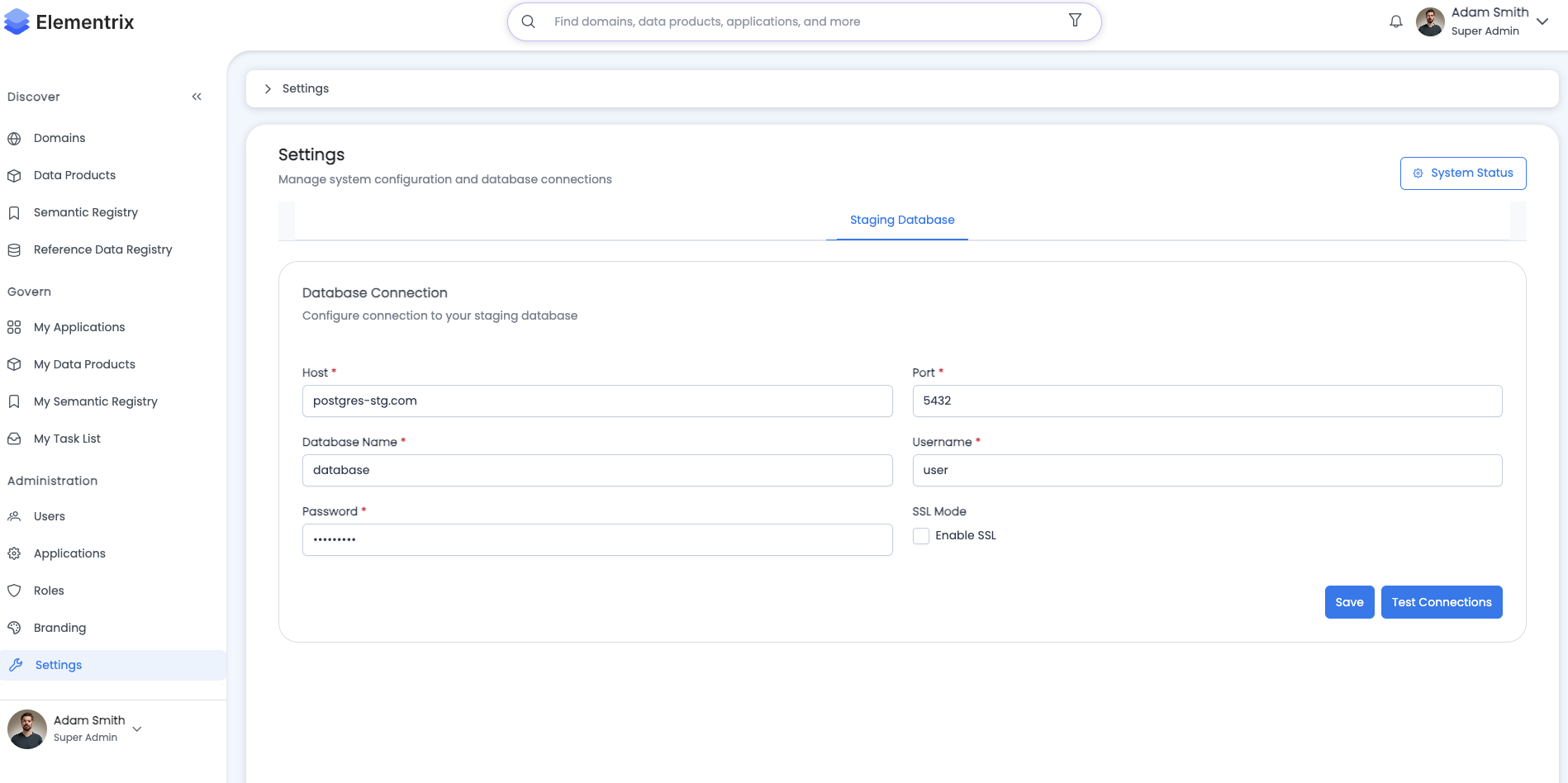
Elementrix provides you with a managed PostgreSQL staging database:
Connection Details:
  Host: staging-db.elementrix.io
  Port: 5432
  Database: staging_<your_org_id>
  Username: <your_username>
  Password: <provided_password>
  SSL Mode: Require

Connection String:
postgresql://<username>:<password>@staging-db.elementrix.io:5432/staging_<your_org_id>?sslmode=require
Access:
- Credentials provided in Elementrix UI under Settings → Staging Database
- Full read/write access to your staging database
¶ 2. Upload Your Data
Use any standard PostgreSQL tool or method to load data into the staging database:
Option A: SQL Client (psql):
# Connect to staging database
psql "postgresql://username:password@staging-db.elementrix.io:5432/staging_org123?sslmode=require"

# Create your table
CREATE TABLE customer_data (
    customer_id UUID PRIMARY KEY,
    name VARCHAR(200),
    email VARCHAR(200),
    created_at TIMESTAMP DEFAULT NOW()
);

# Load data from CSV
\COPY customer_data FROM 'customers.csv' CSV HEADER;

# Or insert directly
INSERT INTO customer_data (customer_id, name, email)
VALUES ('550e8400-e29b-41d4-a716-446655440000', 'John Doe', 'john@example.com');
Option B: GUI Tools (pgAdmin, DBeaver, DataGrip):
- Create new connection with provided credentials
- Create tables using GUI or SQL
- Import data from files (CSV, Excel, JSON)
- Run INSERT/UPDATE statements
Option C: ETL Tools (Airflow, dbt, custom scripts):
# Python example with psycopg2
import psycopg2
import pandas as pd

# Connect to staging database
conn = psycopg2.connect(
    host="staging-db.elementrix.io",
    port=5432,
    database="staging_org123",
    user="username",
    password="password",
    sslmode="require"
)

# Load data from external source (e.g., MongoDB)
from pymongo import MongoClient
mongo_client = MongoClient("mongodb://mongo-host:27017")
data = list(mongo_client.production.customers.find())

# Convert to DataFrame and load to staging
df = pd.DataFrame(data)
df.to_sql('customer_data', conn, if_exists='replace', index=False)

conn.close()
Option D: Oracle to Staging:
# Extract from Oracle and load to PostgreSQL staging
import cx_Oracle
import psycopg2

# Connect to Oracle
oracle_conn = cx_Oracle.connect("user/password@oracle-host:1521/ORCL")
oracle_cursor = oracle_conn.cursor()

# Connect to PostgreSQL staging
pg_conn = psycopg2.connect(
    "postgresql://username:password@staging-db.elementrix.io:5432/staging_org123?sslmode=require"
)
pg_cursor = pg_conn.cursor()

# Extract from Oracle
oracle_cursor.execute("SELECT * FROM production_table")
rows = oracle_cursor.fetchall()

# Create table in staging
pg_cursor.execute("""
    CREATE TABLE IF NOT EXISTS production_table (
        id BIGINT PRIMARY KEY,
        name VARCHAR(200),
        created_at TIMESTAMP
    )
""")

# Load to staging
for row in rows:
    pg_cursor.execute(
        "INSERT INTO production_table VALUES (%s, %s, %s)",
        row
    )

pg_conn.commit()
¶ 3. Create Data Product
Once your data is in the staging database, create a data product using the Elementrix staging connector:
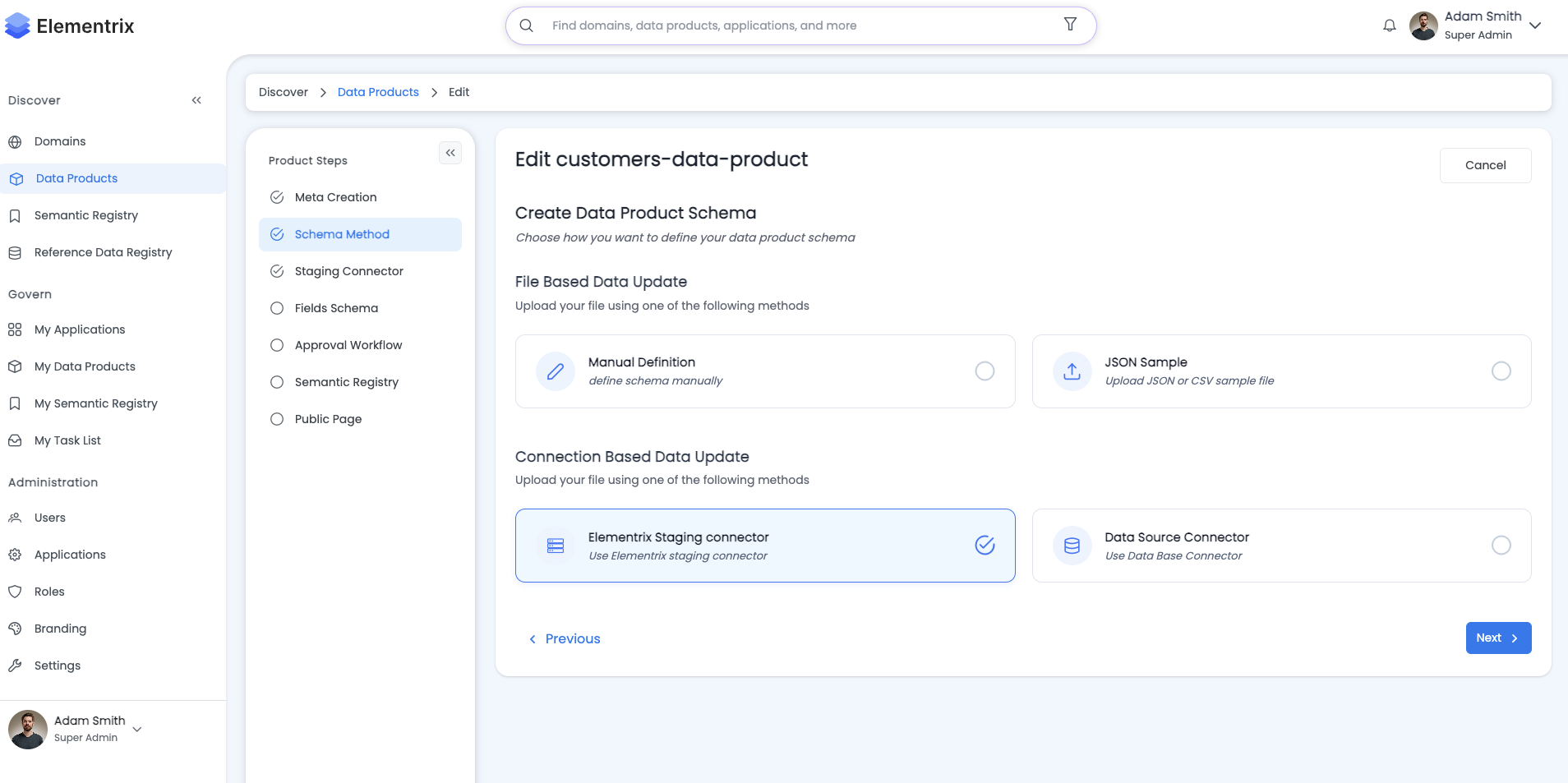
- Navigate to Create Data Product
- Step 2: Schema Method → Select "Elementrix staging connector"
- Step 3: Schema Source:
- Type: PostgreSQL
- Connection: Elementrix Staging Database
- Select Table: Choose your table (e.g.,
customer_data) - Import Schema: Schema automatically imported
- Continue with workflow: Fields, Semantics, Publishing
The process is identical to connecting to a regular PostgreSQL database.
¶ Detailed Workflow
¶ Step 1: Obtain Staging Credentials
- Navigate to Settings → Staging Database
- View your connection details:
Host: staging-db.elementrix.io Port: 5432 Database: staging_org123 Username: org123_admin Password: •••••••••• - Copy connection string or individual credentials
¶ Step 2: Connect to Staging Database
Using psql (Command Line):
# Set environment variable for password (optional)
export PGPASSWORD='your_password'

# Connect
psql -h staging-db.elementrix.io -p 5432 -U org123_admin -d staging_org123

# Test connection
\dt  # List tables
\l   # List databases
Using pgAdmin (GUI):
- Right-click Servers → Create → Server
- General tab:
- Name: Elementrix Staging
- Connection tab:
- Host: staging-db.elementrix.io
- Port: 5432
- Database: staging_org123
- Username: org123_admin
- Password: [your password]
- SSL tab:
- SSL mode: Require
- Click Save
Using Python:
import psycopg2

# Connection parameters
conn_params = {
    "host": "staging-db.elementrix.io",
    "port": 5432,
    "database": "staging_org123",
    "user": "org123_admin",
    "password": "your_password",
    "sslmode": "require"
}

# Connect
conn = psycopg2.connect(**conn_params)
cursor = conn.cursor()

# Test query
cursor.execute("SELECT version();")
print(cursor.fetchone())

cursor.close()
conn.close()
¶ Step 3: Load Your Data
Example 1: Load from API:
import requests
import psycopg2
import json

# Fetch data from API
response = requests.get("https://api.example.com/customers")
customers = response.json()

# Connect to staging
conn = psycopg2.connect(
    "postgresql://org123_admin:password@staging-db.elementrix.io:5432/staging_org123?sslmode=require"
)
cursor = conn.cursor()

# Create table
cursor.execute("""
    CREATE TABLE IF NOT EXISTS api_customers (
        id UUID PRIMARY KEY,
        name VARCHAR(200),
        email VARCHAR(200),
        signup_date TIMESTAMP,
        created_at TIMESTAMP DEFAULT NOW()
    )
""")

# Insert data
for customer in customers:
    cursor.execute("""
        INSERT INTO api_customers (id, name, email, signup_date)
        VALUES (%s, %s, %s, %s)
        ON CONFLICT (id) DO UPDATE SET
            name = EXCLUDED.name,
            email = EXCLUDED.email,
            signup_date = EXCLUDED.signup_date
    """, (
        customer['id'],
        customer['name'],
        customer['email'],
        customer['signup_date']
    ))

conn.commit()
cursor.close()
conn.close()
Example 2: Load from CSV Files:
# Using psql COPY command
psql -h staging-db.elementrix.io -U org123_admin -d staging_org123 << EOF
CREATE TABLE IF NOT EXISTS sales_data (
    sale_id BIGINT PRIMARY KEY,
    product_id INT,
    quantity INT,
    amount DECIMAL(10,2),
    sale_date DATE
);

\COPY sales_data FROM '/path/to/sales.csv' CSV HEADER;
EOF
Example 3: Load from MongoDB:
from pymongo import MongoClient
import psycopg2
from datetime import datetime

# Connect to MongoDB
mongo_client = MongoClient("mongodb://mongo-host:27017")
mongo_db = mongo_client.production
orders = mongo_db.orders.find()

# Connect to staging
pg_conn = psycopg2.connect(
    "postgresql://org123_admin:password@staging-db.elementrix.io:5432/staging_org123?sslmode=require"
)
pg_cursor = pg_conn.cursor()

# Create table
pg_cursor.execute("""
    CREATE TABLE IF NOT EXISTS mongo_orders (
        order_id VARCHAR(50) PRIMARY KEY,
        customer_id VARCHAR(50),
        total_amount DECIMAL(10,2),
        status VARCHAR(50),
        order_date TIMESTAMP,
        created_at TIMESTAMP DEFAULT NOW()
    )
""")

# Load data
for order in orders:
    pg_cursor.execute("""
        INSERT INTO mongo_orders (order_id, customer_id, total_amount, status, order_date)
        VALUES (%s, %s, %s, %s, %s)
        ON CONFLICT (order_id) DO UPDATE SET
            customer_id = EXCLUDED.customer_id,
            total_amount = EXCLUDED.total_amount,
            status = EXCLUDED.status,
            order_date = EXCLUDED.order_date
    """, (
        str(order['_id']),
        order.get('customer_id'),
        order.get('total'),
        order.get('status'),
        order.get('order_date')
    ))

pg_conn.commit()
pg_cursor.close()
pg_conn.close()
¶ Step 4: Create Data Product
- In Elementrix UI, click Create Data Product
- Step 1: Meta - Fill in product details
- Step 2: Schema Method - Select "Database Connector"
- Step 3: Schema Source:
Database Type: PostgreSQL Connection: Elementrix Staging Database (pre-configured) Available Tables: ☑ api_customers ☐ sales_data ☐ mongo_orders - Step 4: Fields Schema - Review imported schema, adjust if needed
- Continue with remaining steps - Workflow, Semantics, etc.
¶ Use Cases
¶ 1. Oracle Database Migration
Scenario: Migrate Oracle production data to Elementrix
Process:
  1. Use Oracle client or ETL tool to extract data
  2. Transform to PostgreSQL-compatible format
  3. Load into staging database
  4. Create data product for consumption
¶ 2. MongoDB Analytics
Scenario: Expose MongoDB collections as structured data products
Process:
  1. Extract documents from MongoDB
  2. Flatten and normalize into relational tables
  3. Load into staging database
  4. Create data products with proper schema
¶ 3. REST API Integration
Scenario: Regular sync from third-party API
Process:
  1. Schedule script (cron, Airflow) to fetch API data
  2. Transform JSON to tabular format
  3. Upsert into staging database
  4. Data product automatically stays in sync
¶ 4. File System Data
Scenario: Process daily CSV/Parquet exports
Process:
  1. Automated job picks up new files
  2. Load files into staging tables
  3. Staging data product provides clean interface
  4. Downstream systems consume via Elementrix API
¶ 5. Legacy System Integration
Scenario: Expose mainframe or legacy system data
Process:
  1. Extract data using legacy tools/scripts
  2. Convert to modern format
  3. Stage in PostgreSQL
  4. Data product provides modern API access
¶ Best Practices
¶ 1. Normalize Data (2NF/3NF)
-- Good: Normalized structure
CREATE TABLE customers (
    customer_id UUID PRIMARY KEY,
    name VARCHAR(200),
    email VARCHAR(200),
    created_at TIMESTAMP DEFAULT NOW()
);

CREATE TABLE orders (
    order_id UUID PRIMARY KEY,
    customer_id UUID REFERENCES customers(customer_id),
    order_date TIMESTAMP,
    total_amount DECIMAL(10,2)
);

-- Avoid: Denormalized structure
CREATE TABLE orders_with_customer_details (
    order_id UUID PRIMARY KEY,
    customer_id UUID,
    customer_name VARCHAR(200),  -- Duplicate data
    customer_email VARCHAR(200), -- Duplicate data
    order_date TIMESTAMP,
    total_amount DECIMAL(10,2)
);
¶ 2. Include Audit Columns
CREATE TABLE product_data (
    id UUID PRIMARY KEY,
    name VARCHAR(200),

    -- Required audit columns
    created_at TIMESTAMP DEFAULT NOW() NOT NULL,
    updated_at TIMESTAMP DEFAULT NOW() NOT NULL,

    -- Recommended audit columns
    created_by VARCHAR(100),
    updated_by VARCHAR(100),
    deleted_at TIMESTAMP  -- For soft deletes
);

-- Update trigger for updated_at
CREATE OR REPLACE FUNCTION update_updated_at_column()
RETURNS TRIGGER AS $$
BEGIN
    NEW.updated_at = NOW();
    RETURN NEW;
END;
$$ LANGUAGE plpgsql;

CREATE TRIGGER update_product_data_updated_at
BEFORE UPDATE ON product_data
FOR EACH ROW
EXECUTE FUNCTION update_updated_at_column();
¶ 3. Use Appropriate Keys
-- Primary Keys: UUID (recommended) or BIGINT
CREATE TABLE transactions (
    transaction_id UUID PRIMARY KEY DEFAULT gen_random_uuid(),
    amount DECIMAL(10,2)
);

-- Or BIGINT with sequence
CREATE TABLE transactions (
    transaction_id BIGSERIAL PRIMARY KEY,
    amount DECIMAL(10,2)
);

-- Foreign Keys: Match referenced table type
CREATE TABLE line_items (
    line_item_id UUID PRIMARY KEY,
    transaction_id UUID REFERENCES transactions(transaction_id),
    product_id UUID REFERENCES products(product_id)
);
¶ 4. Create Indexes for Performance
-- Index on frequently queried columns
CREATE INDEX idx_orders_customer_id ON orders(customer_id);
CREATE INDEX idx_orders_order_date ON orders(order_date);

-- Index for incremental sync (updated_at)
CREATE INDEX idx_customers_updated_at ON customers(updated_at DESC);

-- Composite index for common query patterns
CREATE INDEX idx_orders_customer_date ON orders(customer_id, order_date);
¶ 5. Data Quality Validation
-- Add constraints to ensure data quality
CREATE TABLE validated_data (
    id UUID PRIMARY KEY,
    email VARCHAR(200) NOT NULL CHECK (email ~* '^[A-Za-z0-9._%+-]+@[A-Za-z0-9.-]+\.[A-Z|a-z]{2,}$'),
    age INT CHECK (age >= 0 AND age <= 150),
    amount DECIMAL(10,2) CHECK (amount >= 0),
    status VARCHAR(20) CHECK (status IN ('pending', 'completed', 'failed'))
);
¶ Advantages
✅ No Custom Elementrix Code Required
- Standard PostgreSQL interface
- Use familiar tools and workflows
- No proprietary APIs or formats
✅ Standard PostgreSQL Tooling
- psql, pgAdmin, DBeaver, DataGrip
- Any PostgreSQL-compatible ETL tool
- Existing scripts and processes work as-is
✅ Full Control Over Transformations
- Clean, normalize, and validate data before exposing
- Complex business logic in SQL or scripts
- Test transformations before creating products
✅ Supports Any Data Source
- Oracle, MongoDB, NoSQL databases
- REST APIs, SOAP services
- File systems (CSV, JSON, Parquet, Excel)
- Legacy systems and mainframes
- Third-party data feeds
✅ Familiar Workflow for Data Teams
- Database administrators already know PostgreSQL
- Same tools used for regular database work
- Easy onboarding and training
✅ Incremental Sync Support
- Add
updated_atcolumn and index - Elementrix can sync only changed records
- Efficient for large datasets
¶ Limitations and Considerations
⚠️ Manual Data Loading
- You're responsible for loading data into staging
- Need to schedule and maintain ETL jobs
- Not automatic like direct database connectors
⚠️ Storage Limits
- Staging database has storage limits per tier
- Monitor usage and archive old data as needed
- Consider retention policies
⚠️ Performance
- Large data loads may take time
- Plan for off-peak hours if needed
- Use COPY command for bulk loads (faster than INSERT)
⚠️ Data Freshness
- Depends on your ETL schedule
- Not real-time unless you implement continuous sync
- Consider CDC for real-time needs from source
¶ Next Steps
- Review Database Connectors for direct database sync
- Explore Data Product Creation Workflow for creating products
- Check Product Schema for schema best practices